Saturday, April 09, 2011

Add Spell Checker to Microsoft Dynamics CRM Application

In CRM projects, I often hear the complaints about the lack of spell checking feature in CRM application. Most business users tend to believe it's the application's fault for not having such important feature. In fact, spell checking should be something offered by browser. If you have ever tried any other browsers in the market, you may have noticed that most browsers (Chrome, Opera, Firefox, Safari) nowadays are offering spell checking feature out-of-the-box. IE has been pretty much the only exception among those modern browsers in this perspective.

I was previously aware of an IE addon called ieSpell which offers spell checking solution in IE. But it is far from being an ideal solution because it doesn't instantly highlight any wrong spellings, which in my opinion makes it almost useless.

I happened to come across another free IE addon called Speckie this week which I believe provides a much better spell checking solution in IE. So I thought I should share with everyone here.

After you have installed Speckie, you may notice that Speckie doesn't perform spell check for single line textbox field by default. If you want to enable this option, you can go to IE Tools menu, and click "Speckie Options".

Speckie Options

Then you can check "Enable spell check in single line edit fields" option, and click "Apply" button.

Configure Speckie

After you have done so, you should restart your browser in order for the option to take effect.

The following are a few screenshots in action.

  • Speckie spell checking for MSCRM4 textbox field

Spell Check for CRM4 Textbox Field

  • Speckie spell checking for MSCRM4 notes field

Spell Check for CRM4 Notes Field

  • Speckie spell checking for MSCRM4 textbox field

Spell Check for CRM2011 Textbox Field

I have only been using this addon for a couple of days, I cannot endorse the quality and reliability of this addon. But I am so far very happy with it.

Hope this helps.

Thursday, April 07, 2011

Reached 50,000 Page Views!

I happened to have noticed today that my blog has just reached 50,000 page views this week, based on the data from Google Analytics. You may have noticed that I have a Blogger pageview widget which is only counting to about 43,500 views as of today. The reason for the difference is, PageView stats function was not available on Blogger platform in the very beginning. Believe me, I didn't lie to you, the following is the Google Analytics stats information that I took the screenshot about 90 minutes ago. 50000PageViews
Please don't think that I'm trying to show off here. With only 50,000 Page Views in total in one and half years, there is nothing to show off about. IMHO, I am nowhere close to the page views of any Lady Gaga fan blogs, and I don't think that I would ever be able to make this blog as popular as they are any time soon.

About two years ago (Apr 29, 2009 to be exact), I felt a little bored so I started the journey of writing a technical blog. Did I just sound very politic? YES, I suppose that I was a bit. In fact, one of the important reason is, I don't usually keep track of every details in a very organized way, sometimes I can lose track of what I just did a few days ago or probably a few months ago. In China, we have a say, "The palest ink is better than the best memory". So writing a technical blog not only helps challenges myself, but also has helped me keep track of such details. However, there is another important motivation, which should be kept just between you and me, I have been sick of walking into an interview room with a piece of resume in my hand, which doesn't prove anything nowadays. So I thought writing a technical blog would prove that I am capable of doing some little things, that was just the selfish part of myself. However, I didn't realize in the beginning that writing a blog was actually quite a challenge. As you may not appreciate, it did take me quite a lot of personal spare time to keep this blog updated, even though I am well aware that I haven't actually written much so far. I have to admit, my writing was terribly slow and my English was often broken (thanks for bearing with me all the time), and often times I had to revise my blog posts again and again just trying to make them readable. On a side note, I have quite a lot other topics in my mind that I just haven't got the time to write them down, including some pretty cool (only in my own opinion though) ideas that I wanted to implement on MSCRM platform.

My blog has been mostly focused on MSCRM development practice to this date. I might be switching to some other topics in the future, as MSCRM is no longer something that I am working on daily basis. But I will try to write some CRM posts when I can find time.

Thanks to the CRM community for your support all the time, and more importantly your patience while listening to my mumblings.

Sunday, April 03, 2011

MSCRM 4.0 Error: "Record is Unavailable" after CRM Organization Import

I recently ran into an interesting CRM error after I imported a CRM organization. I got the following error when I was trying to navigate to CRM homepage, after the CRM organization was successfully imported.
Record is Unavailable
The requested record was not found or you do not have sufficient permissions to view it. 
CMIS Import Organization Error

The solution was actually quite simple, you just have to reboot your server after you have imported a CRM organization. I got stumbled upon this error at least twice recently, so I thought I should blog it in case that in the case that you happen to run into this error too.

I believe the error happens when you try to refresh your CRM environment using the same CRM organization name in Deployment Manager before and after the import. My situation is, I had a CRM organization name called ABC previously. But I need to refresh this particular environment (UAT) by using a full db backup from another environment (Production). So I have to create a temporary CRM organization in my UAT server's Deployment Manager, and then I can import the production db backup in order to use the same CRM organization name (ABC). My sense is the CRM organization name was not changed during the ABC –> Temp –> ABC import process, CRM Web application was on the assumption that nothing has changed, so it didn't try to refresh all cached CRM application data including CRM organization information, metadata, etc., which pitifully caused this error.

I believe you could also resolve this problem by restarting all CRM related services on the CRM server, including IIS, CRM Asynchronous Service, and possibly Email Router, etc. But rebooting is always the easiest solution to try first when we have problems with our computers, isn't it?

Hope this helps.

Monday, March 07, 2011

MSCRM 4.0: Customize the Lookup View of Role Entity

In my current project, I developed a custom workflow called IsUserInRole which helps determine whether a user is in a particular role. It all worked fine, until we deployed the workflows to our UAT and production environments.

Let me try to explain what the problem is. The custom workflow has a lookup input parameter for Role entity which allows the business user to specify a CRM role to test whether the current user or a specified user has that particular role. In our local VPC development environment, we tried to keep everything simple, we only had a root business unit for the CRM installation. So the IsUserInRole workflow can show all the roles in the CRM system without any confusion. But in our UAT and production environments, we had more than one business unit, so all the roles that we created in the root business unit were automatically copied to the child business units, which caused significant confusion for the CRM workflows that used IsUserInRole workflow. When we were trying to use CRM lookup to pick a role, we got something like the following screen shot, which you could see a number of roles in the same name but they actually belonged to different business units. This created a challenge for us, as we could easily pick a wrong role, so that the custom workflow would not function in the way that we expected.
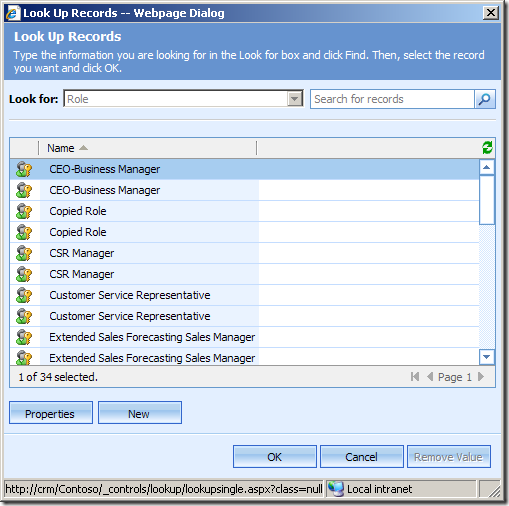
CRM Default Role Lookup View
I first thought this would be an easy job, as CRM allows us to define almost any views. But when I fired up the customization page of Role entity, I realized that is a totally different story, CRM didn't provide a way that allows me to customize any view for role entity. I went on thinking about using exported role entity customization xml file, but I hit a wall again as I noticed that the role entity customization XML file was almost empty, it had no view information or whatsoever in the export xml file.

After a little struggle, I realized that I might be able to take a shortcut by directly typing in CRM view customization page's URL with the view's ID. So I took a peek of CRM database using the following SQL query.
 SQL Query for Role Lookup View
After running the above SQL script, I have got the view's ID. What I need to do next is, go to a customizable entity, and double click one of its views to launch a view customization page, and I press Ctrl+N key to launch the page in a new window so that I can have IE address bar. Then I replace the ID parameter in the address bar with the view ID I have just got from previous SQL query, so that I have a URL in the following format.

http://<CrmServer>/<CrmOrganizationName>/tools/vieweditor/viewManager.aspx?id={61F8D435-8E25-4751-8330-5969506EF536}

As soon as I have the above URL typed in and hit my browser's Go button, I get just a regular view customization screen. Whew!
Edit CRM Role Lookup View
You might already know, as soon as we get to this point, the rest is fairly easy. I added "Business Unit" column to the view using "Add View Columns" button on the right, and then published all CRM customization changes. After that, I came back to my custom workflow and I noticed that I could see the Business Unit column in the lookup view. 
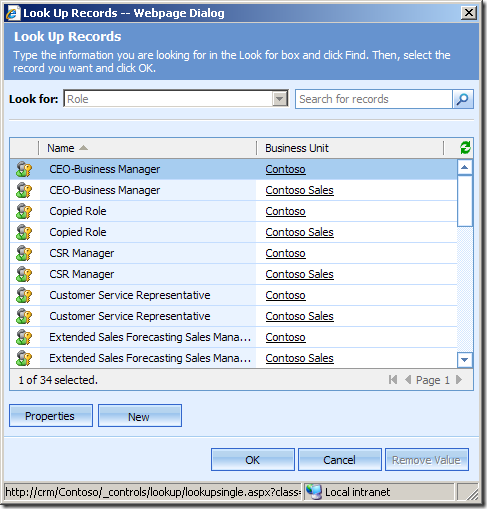
CRM Role Lookup View with Business Unit Column
I believe this technique not only applies to the views of CRM role entity, you should also be able to use it to customize almost all views of core CRM entities such as Team, Queue, Workflow, etc., if you ever happen to have this kind of needs.  

Hope this helps.

P.S. I would have used a different solution for my custom workflow if I foresaw the problem of using Role lookup that I have mentioned, but I do hope this blog post helps if you ever come across similar needs in your project.

Sunday, March 06, 2011

Taking a Break, and Looking for Business Opportunities

After three years (3 years and 5 months to be accurate) of hard working days with my current employer, I decided to take a short break and give myself a little bit time to think about what I am going to do next.

As a quick retrospect of the last 3 years, I believe I have gained significant experience with Microsoft Dynamics CRM, SharePoint, .NET, and Enterprise Application Development. I worked hard, thought hard, and made sure that I have been doing the right thing for my project and the applications that I was developing. I tried to discipline myself by leveraging the best practices that I have learned from the community, which has been a great achieving 3 years.

March 31 is going to be my last day with my current employer, which means on April 1st, I will be jobless (What a April fool's day!).

We have a small local community of Microsoft Dynamics CRM development work in the city where I live. What this means is, I might have to go with different development practice, such as .NET, SharePoint (admittedly, I much prefer MSCRM when comparing to SharePoint) or even something totally different (maybe Ruby or Python). In other words, I might be leaving MSCRM community for a short period of time. But I will still try to keep an eye on Microsoft Dynamics CRM, particularly I will stay on Microsoft Dynamics CRM Development Forum by helping the community whenever I can find time.

Speaking about the business opportunities that I am looking for, I am listing what I can offer to help for MSCRM platform.
  1. Microsoft Dynamics CRM Development
  2. Microsoft Dynamics CRM Solution Architecting
  3. Microsoft Dynamics CRM Planning and Implementation
  4. Microsoft Dynamics CRM Data Migration and Data Integration
  5. Microsoft Dynamics CRM Document Automation and SharePoint Integration Solution
  6. Microsoft Dynamics CRM Development Training
When it comes to training, most people tend to overlook its importance. Microsoft Dynamics CRM is a complex business application platform, which requires quite steep learning curve. Training not only helps you save your investment, but also helps you get the job done faster with better quality. I have an extreme passion about writing quality software code (you may argue that I am actually writing poor code, but at least I am trying to be better everyday), so I think I can help build up your team resource in one way or another, by sharing the lessons and experiences that I have learned during the past years.

If you want to offer me a job or a contract work (it doesn't have to be MSCRM), please do so, I am very positive that I can help in certain ways. If in any case that you may want to offer me a technical executive position, you will have to buy me a cup of coffee so that we can sit down and have a talk. ;-)

You may reach me by my personal email at (danielwcai at gmail dot com).

Cheers!

[Update - Mar 23, 2011] I have decided to pursue a local contract position, which is not relevant to MSCRM. Thanks for your time. I apologize if this blog post has caused any confusions in the community.

Wednesday, February 16, 2011

MSCRM vs Normalization?

Today I ran into a silly discussion about Microsoft Dynamics CRM and normalization in a meeting. A senior consultant in my team made a statement that "MSCRM database is not normalized" during the meeting. I was astonished and shocked when I heard this statement. I challenged him and asked him to prove where his point stands. He claimed that CRM picklist metadata is not normalized. Well, that's sort of true, we cannot re-use a picklist across entities in CRM 4.0, and I told him that's not going to be the case in CRM 2011 which has the support of global option set so that you can define reusable picklist options. He didn't give in to that because the project we were discussing is still using CRM 4.0. The silly part of the discussion was, I firmly believed that MSCRM platform supports and encourages normalization in every possible aspect, but his point was that MSCRM is totally the opposite of database normalization (just because of the picklist options), which was so wrong.

Let me have a quick summary about my points:
  • Microsoft Dynamics CRM database itself has respected database normalization principle in general. But some CRM metadata tables and some few business entities are not fully normalized for either performance reasons, or due to constraints of the platform.
  • Microsoft Dynamics CRM fully utilizes relational data model which is the foundation of the platform.
  • Microsoft Dynamics CRM fully encourages normalization through its flexible entity relationship models including one to many, and many to many. Those relationships are not only available to two different entities, but also can be applied to the same entity through self-referential relationship. What level of normalization that your custom application can achieve on CRM platform really depends on how you design your CRM entities and their relationships. You use the relationships between entities to normalize your data, which is an almost identical approach to what you would do in any traditional data modeling practice, where a CRM entity can be seen as a database table, while a CRM field (or attribute) can be seen as a table column. In this sense, CRM entity & database table are pretty much a pair of interchangeable terms, so are CRM field & table column.
  • If you are currently using CRM 4.0, and you want to reuse some picklists. An alternative solution would be using a lookup entity, which contains all the options, so they can be re-used and referenced by different entities. If you want to provide better usability, you can use a script from one of my other blog posts to convert the lookups into picklists. 
When it comes to the discussion about the level of database normalization that we should be actually pursuing in the real-world project, I have seen some people really become religious simply because that's what they have been told from the textbook. I don't want to start a war here, but I do want to make my points quickly, my take or solution to this issue is, normalize to the point that your data model looks logic enough so that it reflects and satisfies your business requirements, while not sacrificing the scalability and maintainability of your application.

Cheers!