Showing posts with label MSCRM Workflow. Show all posts

Friday, December 16, 2011

MSCRM 2011: Two Errors When Using CRM Developer Toolkit to Deploy Workflow Library

While I was trying to develop a custom workflow library using CRM developer toolkit, I run into the following two errors (actually one at a time, but I am trying to keep the long story short).
Error registering plugins and/or workflows. A validation error occurred. The value of 'isolationmode' on record of type 'pluginassembly' is outside the valid range.
Error registering plugins and/or workflows. Description name must be specified
Parameter name: description
The solution is rather simple. What you need to do is to open RegisterFile.crmregister file (which is essentially an XML file) under CrmPackage project, and make some changes to the file in order to provide enough information for the deployment.
  1. Locate the Solution line of the workflow library in the XML file, add an XML attribute called IsolationMode, and give it a value of "None", so the XML attribute will be IsolationMode="None". 
  2. Located WorkflowType line, and add an XML attribute called Description, and give it a value which is meaningful. 
The following is the screen shot of the file before the change.

After the fixes, the file should look like this.
After you have made the above changes, you should be able to deploy your CRM workflow library in Visual Studio without problem.
Hope this helps if you ever run into the same issue.

Wednesday, July 07, 2010

CRM Export Customization Error and Workflow "Query Builder Error - No Entity"

I was recently promoting some significant customization changes from one environment (DEV) to another (UAT). Since the changes involved some physical name changes of a few CRM entities and attributes, so I have to delete all those involved entities and import the customizations that I have exported from DEV. The import on UAT was successful, and the application simply runs fine until I was trying to export all customizations on UAT, which gives me the following stunning error message - "The entity with ObjectTypeCode = 100xx was not found in the MetadataCache":
<?xml version="1.0" ?>
<error xmlns:xsi="http://www.w3.org/2001/XMLSchema-instance" xmlns:xsd="http://www.w3.org/2001/XMLSchema">
<code>0x80041102</code>
<displaytitle>Query Builder Error</displaytitle>
<displaytext>No Entity</displaytext>
<description>The entity with ObjectTypeCode = 10088 was not found in the MetadataCache.</description>
<file>Not available</file>
<line>Not available</line>
<details>The entity with ObjectTypeCode = 10088 was not found in the MetadataCache.</details>
<requesturl>http://MyCrmServer/CrmOrgName/_grid/cmds/dlg_exportcustomizations.aspx</requesturl>
<pathAndQuery>/CMIS-UAT/_grid/cmds/dlg_exportcustomizations.aspx</pathAndQuery>
<source>XML</source>
<stacktrace />
</error>
ObjetTypeCode Not Found
The story doesn't just end here. When I tried to click "Workflows" link in my CRM's Settings area, I got the following beautiful "Query Builder Error – No Entity" CRM screen.
Query Builder Error
After a little search on Internet, I found that CRM MVP David Yack has documented this error, which pointed me to the right direction. Based on his information, I was able to fix the problem by using the following procedures.
  1. Launch SQL Management Studio and connect to CRM database.
  2. Determine which workflow is causing the problem by using the following SQL script.
    SELECT * FROM WorkflowBase 
    WHERE PrimaryEntity='10088' -- The entity code that caused the problem
    By looking at the returned record and its Name column, which is the workflow's name, you should know which workflow is causing the problem, at the same time you should be able to figure out which entity is actually causing the problem. For instance, you have figured that 'new_myentity' is the culprit.

  3. Determine the offending entity's ObjectTypeCode by issuing the following SQL script.
    SELECT ObjectTypeCode FROM MetadataSchema.Entity
    WHERE Name='new_myentity' -- The entity's name that caused the problem
    You should now get an integer code, so that we can use next. For instance, we got a number of 10095. 

  4. Run the following SQL script to correct the issue. 
    UPDATE WorkflowBase
    SET PrimaryEntity='10095' -- The correct entity code (The code that you got from step 3)
    WHERE PrimaryEntity='10088' -- The entity code that caused the problem
    You should expect a few records to be updated depending on how many workflows were involved. 
After you have done the above procedures, you should be able to do full customization export, and also you should be able to manage your workflows again.

BE ADVISED, any direct change made to CRM database could cause potential problem to the application, make sure to have a full database backup before doing so.

The cause of the problem might be that as soon as I finished deleting old CRM entities on the UAT environment, I immediately imported the customizations. CRM server might not have actually cleaned up the metadata cache at the point of the import, which ends up the orphan workflow records in CRM database.

Hope this helps if you ever run into the same error.

Thursday, May 13, 2010

MSCRM 4.0: Offset CRM Dates in Workflow without Being Limited

When using Microsoft Dynamics CRM workflow designer tool, you will be limited to a maximum of 31 days (as shown below) if you ever need an offset date based on another CRM date. The same limitation also apply to months, the maximum offset of months is 36 months.
CRM Date Offset Limitation
In order to overcome the limit, I have come up two custom workflow activity classes which let you create any offset date, using the workflow base class that I just created.

1. InvariantOffsetDays
using System;
using System.Globalization;
using System.Workflow.ComponentModel;
using Microsoft.Crm.Workflow;
using Microsoft.Crm.Sdk;

namespace CrmSpikes.Workflow
{
    /// 
    /// Calculate a series of dates using a base date with a set of predefined offset numbers. 
    /// @author Daniel Cai, http://danielcai.blogspot.com/
    /// 
    [CrmWorkflowActivity("Invariant Offset Days", "Custom Workflow")]
    public class InvariantOffsetDays : SingleActivityBase
    {
        private DateTime _baseDate;

        #region Workflow Parameters

        public static DependencyProperty BaseDateProperty =
            DependencyProperty.Register("BaseDate", typeof(CrmDateTime), typeof(InvariantOffsetDays));
        [CrmInput("Base Date")]
        public CrmDateTime BaseDate
        {
            get
            {
                return (CrmDateTime)GetValue(BaseDateProperty);
            }
            set
            {
                SetValue(BaseDateProperty, value);
            }
        }

        public static DependencyProperty Offset7DaysProperty =
            DependencyProperty.Register("Offset7Days", typeof(CrmDateTime), typeof(InvariantOffsetDays));
        [CrmOutput("7 Days after the base date")]
        public CrmDateTime Offset7Days
        {
            get
            {
                return (CrmDateTime)GetValue(Offset7DaysProperty);
            }
            set
            {
                SetValue(Offset7DaysProperty, value);
            }
        }

        public static DependencyProperty Offset14DaysProperty =
            DependencyProperty.Register("Offset14Days", typeof(CrmDateTime), typeof(InvariantOffsetDays));
        [CrmOutput("14 Days after the base date")]
        public CrmDateTime Offset14Days
        {
            get
            {
                return (CrmDateTime)GetValue(Offset14DaysProperty);
            }
            set
            {
                SetValue(Offset14DaysProperty, value);
            }
        }

        public static DependencyProperty Offset21DaysProperty =
            DependencyProperty.Register("Offset21Days", typeof(CrmDateTime), typeof(InvariantOffsetDays));
        [CrmOutput("21 Days after the base date")]
        public CrmDateTime Offset21Days
        {
            get
            {
                return (CrmDateTime)GetValue(Offset21DaysProperty);
            }
            set
            {
                SetValue(Offset21DaysProperty, value);
            }
        }

        public static DependencyProperty Offset28DaysProperty =
            DependencyProperty.Register("Offset28Days", typeof(CrmDateTime), typeof(InvariantOffsetDays));
        [CrmOutput("28 Days after the base date")]
        public CrmDateTime Offset28Days
        {
            get
            {
                return (CrmDateTime)GetValue(Offset28DaysProperty);
            }
            set
            {
                SetValue(Offset28DaysProperty, value);
            }
        }

        public static DependencyProperty Offset35DaysProperty =
            DependencyProperty.Register("Offset35Days", typeof(CrmDateTime), typeof(InvariantOffsetDays));
        [CrmOutput("35 Days after the base date")]
        public CrmDateTime Offset35Days
        {
            get
            {
                return (CrmDateTime)GetValue(Offset35DaysProperty);
            }
            set
            {
                SetValue(Offset35DaysProperty, value);
            }
        }

        public static DependencyProperty Offset42DaysProperty =
            DependencyProperty.Register("Offset42Days", typeof(CrmDateTime), typeof(InvariantOffsetDays));
        [CrmOutput("42 Days after the base date")]
        public CrmDateTime Offset42Days
        {
            get
            {
                return (CrmDateTime)GetValue(Offset42DaysProperty);
            }
            set
            {
                SetValue(Offset42DaysProperty, value);
            }
        }

        public static DependencyProperty Offset49DaysProperty =
            DependencyProperty.Register("Offset49Days", typeof(CrmDateTime), typeof(InvariantOffsetDays));
        [CrmOutput("49 Days after the base date")]
        public CrmDateTime Offset49Days
        {
            get
            {
                return (CrmDateTime)GetValue(Offset49DaysProperty);
            }
            set
            {
                SetValue(Offset49DaysProperty, value);
            }
        }

        public static DependencyProperty Offset56DaysProperty =
            DependencyProperty.Register("Offset56Days", typeof(CrmDateTime), typeof(InvariantOffsetDays));
        [CrmOutput("56 Days after the base date")]
        public CrmDateTime Offset56Days
        {
            get
            {
                return (CrmDateTime)GetValue(Offset56DaysProperty);
            }
            set
            {
                SetValue(Offset56DaysProperty, value);
            }
        }

        #endregion

        #region SequenceActivity

        protected override void ExecuteBody()
        {
            _baseDate = BaseDate.UniversalTime;

            Offset7Days = CalculateOffsetDate(7);
            Offset14Days = CalculateOffsetDate(14);
            Offset21Days = CalculateOffsetDate(21);
            Offset28Days = CalculateOffsetDate(28);
            Offset35Days = CalculateOffsetDate(35);
            Offset42Days = CalculateOffsetDate(42);
            Offset49Days = CalculateOffsetDate(49);
            Offset56Days = CalculateOffsetDate(56);
        }

        private CrmDateTime CalculateOffsetDate(int offset)
        {
            DateTime resultDate = _baseDate.AddDays(offset);
            return CrmDateTime.FromUniversal(resultDate);
        }

        #endregion
    }
}
After you have registered the workflow assembly, and added the custom workflow activity to your workflow by providing a base date, you can then access the generated offset dates as shown below:
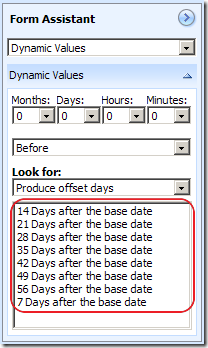
InvariantOffset
InvariantOffsetDays class uses a set of predefined offset numbers to generate a series of offset dates based on the provided base CRM date. The offset is hard-coded in the class due to the way how workflow activity works. You may change it to any intervals or any combination of offset numbers.

2. VariantOffsetDays class
using System;
using System.Globalization;
using System.Workflow.ComponentModel;
using Microsoft.Crm.Workflow;
using Microsoft.Crm.Sdk;

namespace CrmSpikes.Workflow
{
    /// <summary>
    /// Calculate a new date using a base date and an offset number (positive or negative). 
    /// @author Daniel Cai, http://danielcai.blogspot.com/
    /// </summary>
    [CrmWorkflowActivity("Variant Offset Days", "Custom Workflow")]
    public class VariantOffsetDays : SingleActivityBase
    {
        #region Workflow Parameters

        public static DependencyProperty BaseDateProperty =
            DependencyProperty.Register("BaseDate", typeof(CrmDateTime), typeof(VariantOffsetDays));
        [CrmInput("Base Date")]
        public CrmDateTime BaseDate
        {
            get
            {
                return (CrmDateTime)GetValue(BaseDateProperty);
            }
            set
            {
                SetValue(BaseDateProperty, value);
            }
        }

        public static DependencyProperty OffsetProperty =
            DependencyProperty.Register("Offset", typeof(CrmNumber), typeof(VariantOffsetDays));
        [CrmInput("Offset (Positive or Negative)")]
        public CrmNumber Offset
        {
            get
            {
                return (CrmNumber)GetValue(OffsetProperty);
            }
            set
            {
                SetValue(OffsetProperty, value);
            }
        }

        public static DependencyProperty ResultDateProperty =
            DependencyProperty.Register("ResultDate", typeof(CrmDateTime), typeof(VariantOffsetDays));
        [CrmOutput("Result Date")]
        public CrmDateTime ResultDate
        {
            get
            {
                return (CrmDateTime)GetValue(ResultDateProperty);
            }
            set
            {
                SetValue(ResultDateProperty, value);
            }
        }

        #endregion

        #region SequenceActivity

        protected override void ExecuteBody()
        {
            DateTime baseDate = BaseDate.UniversalTime;
            DateTime resultDate = baseDate.AddDays(Offset.Value);
            ResultDate = CrmDateTime.FromUniversal(resultDate);
        }

        #endregion
    }
}
VariantOffsetDays class accepts two parameters, which are the base date, and the offset days (int, either positive or negative), as shown below. It’s a more flexible solution than InvariantOffsetDays, the trade-off is it can only generate one offset date at one time.
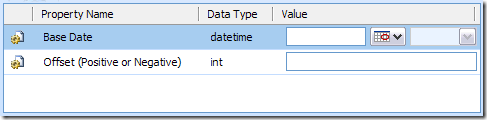
VariantOffset

Both classes can be used to create any type of offset, including month-based offset or year-based offset, which is your call. 

The reason that I wrote this blog post was that two persons asked similar questions within a month on CRM Development Forum and CRM Forum about how to specify an offset date for a CRM workflow that cannot be done using the native CRM workflow design tool. There doesn't seem to be any available solution on Internet to address this issue, so I decided to write the custom workflow along with the workflow base class.

Note: Please make sure to include the workflow base class that I created in order to compile the code.

Download the source code and compiled assembly below.


Hope this helps if you ever need to do the same thing.

MSCRM 4.0: A Convenience Workflow Base Class

When writing CRM workflow code, you often need to look up some information from its execution context, or instantiate CRM Web Service from the context. If your workflow is complex, you might have more than one method in your workflow activity class, in which case, you are most likely going to pass around the execution context object or the instance of CRM Web Service from one method to another, which is really tedious.

I have come up a convenience workflow base class which might help you become more proficient when developing your custom workflow activity code.

using System;
using System.Workflow.Activities;
using Microsoft.Crm.Workflow;
using System.Workflow.ComponentModel;
using Microsoft.Crm.Sdk;
using System.Web.Services.Protocols;

namespace CrmSpikes.Workflow
{
    /// <summary>
    /// Base class for all Sequence Workflow Activities which consist of only a single workflow activity.
    /// @author Daniel Cai, http://danielcai.blogspot.com/
    /// </summary>
    public abstract class SingleActivityBase : SequenceActivity
    {
        private ICrmService _crmServiceHandle;
        private IMetadataService _metadataServiceHandle;

        #region Base class members

        public IWorkflowContext Context { get; set; }

        /// <summary>
        /// CRM Web Services, instantiated on-demand.
        /// </summary>
        public ICrmService CrmServiceHandle
        {
            get
            {
                _crmServiceHandle = _crmServiceHandle ?? Context.CreateCrmService();
                return _crmServiceHandle;
            }
        }

        /// <summary>
        /// CRM Metadata Service, instantiated on-demand.
        /// </summary>
        public IMetadataService MetadataServiceHandle
        {
            get
            {
                _metadataServiceHandle = _metadataServiceHandle ?? Context.CreateMetadataService();
                return _metadataServiceHandle;
            }
        }
        #endregion

        #region SequenceActivity

        /// <summary>
        /// Workflow step.
        /// </summary>
        protected override ActivityExecutionStatus Execute(ActivityExecutionContext executionContext)
        {
            try
            {
                IContextService _contextService = (IContextService) executionContext.GetService(typeof (IContextService));
                Context = _contextService.Context;

                ExecuteBody();
            }
            catch (SoapException ex)
            {
                string errMsg = string.Format("{0}: {1}", ex, ex.Detail.InnerText);
                throw new InvalidPluginExecutionException(errMsg);
            }
            catch (Exception ex)
            {
                string errMsg = string.Format("{0}: {1}", ex, ex.Message);
                throw new InvalidPluginExecutionException(errMsg);
            }
            finally
            {
                if (_crmServiceHandle != null)
                    _crmServiceHandle.Dispose();

                if (_metadataServiceHandle != null)
                    _metadataServiceHandle.Dispose();

                Context = null;
            }

            return ActivityExecutionStatus.Closed;
        }

        /// <summary>
        /// Overridden in derived classes: contains the actual workflow step.
        /// </summary>
        protected abstract void ExecuteBody();

        #endregion
    }
}

To take advantage of the base class, your workflow class should inherit from the above SingleActivityBase class, such as this one.

using Microsoft.Crm.Workflow;

namespace CrmSpikes.Workflow
{
    [CrmWorkflowActivity("My Custom Workflow", "Custom Workflow")]
    public class MyCustomWorkflow : SingleActivityBase
    {
        #region Workflow Parameters
        #endregion

        #region SequenceActivity

        protected override void ExecuteBody()
        {
            // Do my stuff
        }

        #endregion
    }
}

The benefits of using the convenient base class are:

  1. You can use the base class’s Context property to access the your workflow execution context anywhere in your activity class that you inherit from the base class.
  2. You can use the base class’s CrmServiceHandle property to make CRM service calls right away. The base class takes care of instantiating (and also disposing) CRM Web Service in an on-demand fashion.
  3. Similar to the above, you can use the base class’s MetadataServiceHandle property to make CRM metadata service calls right away. The base class takes care of instantiating (and also disposing) CRM Metadata Service in an on-demand fashion as well.
  4. The base class tries to handle exceptions in a consistent way.

The idea was originally inspired by one of open source projects on CodePlex.com site, but I don't remember which project it is. However, the code here is pretty much a complete rewrite from the scratch. If you happen to know the project, please let me know, I will include a link here to the original project. :-)

It’s not rocket science, but it should make your CRM workflow development a little more convenient. Of course, if you have even better idea about the base class, I would appreciate to have your comments here.

Cheers!