I just published a blog post on my company's blog site, which explains the reason why you might encounter the "Value cannot be null. Parameter name: authenticationCredentials.SupportingCredentials" error when connecting to CRM discovery service.
This error could happen when you use CRM SDK code, Plugin Registration Tool, or CRM Developer Toolkit to discover CRM organizations.
Since the blog post particularly discusses the usage SSIS Integration Toolkit and relevant screenshots, so I will keep the post there, but provide a link here.
Hope this helps.
Showing posts with label MSCRM Troubleshooting. Show all posts
Showing posts with label MSCRM Troubleshooting. Show all posts
Friday, May 17, 2013

Sunday, April 03, 2011
MSCRM 4.0 Error: "Record is Unavailable" after CRM Organization Import
I recently ran into an interesting CRM error after I imported a CRM organization. I got the following error when I was trying to navigate to CRM homepage, after the CRM organization was successfully imported.

The solution was actually quite simple, you just have to reboot your server after you have imported a CRM organization. I got stumbled upon this error at least twice recently, so I thought I should blog it in case that in the case that you happen to run into this error too.
I believe the error happens when you try to refresh your CRM environment using the same CRM organization name in Deployment Manager before and after the import. My situation is, I had a CRM organization name called ABC previously. But I need to refresh this particular environment (UAT) by using a full db backup from another environment (Production). So I have to create a temporary CRM organization in my UAT server's Deployment Manager, and then I can import the production db backup in order to use the same CRM organization name (ABC). My sense is the CRM organization name was not changed during the ABC –> Temp –> ABC import process, CRM Web application was on the assumption that nothing has changed, so it didn't try to refresh all cached CRM application data including CRM organization information, metadata, etc., which pitifully caused this error.
I believe you could also resolve this problem by restarting all CRM related services on the CRM server, including IIS, CRM Asynchronous Service, and possibly Email Router, etc. But rebooting is always the easiest solution to try first when we have problems with our computers, isn't it?
Hope this helps.
Record is Unavailable
The requested record was not found or you do not have sufficient permissions to view it.

The solution was actually quite simple, you just have to reboot your server after you have imported a CRM organization. I got stumbled upon this error at least twice recently, so I thought I should blog it in case that in the case that you happen to run into this error too.
I believe the error happens when you try to refresh your CRM environment using the same CRM organization name in Deployment Manager before and after the import. My situation is, I had a CRM organization name called ABC previously. But I need to refresh this particular environment (UAT) by using a full db backup from another environment (Production). So I have to create a temporary CRM organization in my UAT server's Deployment Manager, and then I can import the production db backup in order to use the same CRM organization name (ABC). My sense is the CRM organization name was not changed during the ABC –> Temp –> ABC import process, CRM Web application was on the assumption that nothing has changed, so it didn't try to refresh all cached CRM application data including CRM organization information, metadata, etc., which pitifully caused this error.
I believe you could also resolve this problem by restarting all CRM related services on the CRM server, including IIS, CRM Asynchronous Service, and possibly Email Router, etc. But rebooting is always the easiest solution to try first when we have problems with our computers, isn't it?
Hope this helps.
Monday, February 07, 2011
Error When a Picklist Option Deleted but with Data Referenced
Today I ran into a strange error when I was trying to open a CRM view. I got a screen shown as below (In case you are curious, I have CRM DevErrors option turned On in my web.config file in order to show CRM error in the following fashion):

Basically CRM was complaining with the following message:
Microsoft CRM Error Report:
Error Description:
An unhandled exception occurred during the execution of the current web request. Please review the stack trace for more information about the error and where it originated in the code.

Error Details:
Exception of type 'System.Web.HttpUnhandledException' was thrown.

Full Stack:
[KeyNotFoundException: The given key was not present in the dictionary.]
at System.ThrowHelper.ThrowKeyNotFoundException()
at System.Collections.Generic.Dictionary`2.get_Item(TKey key)
at Microsoft.Crm.BusinessEntities.PagingHelper.GetValueAsString(AttributeInfo attribute, ExecutionContext context)
at Microsoft.Crm.BusinessEntities.PagingHelper.Serialize(OrderExpressionCollection orderCollection, BusinessEntityCollection entities, Int32 pageNum, ExecutionContext context)
at Microsoft.Crm.BusinessEntities.PagingHelper.CreatePagingCookie(BusinessEntityCollection entities, EntityExpression entityExpression, ExecutionContext context)
at Microsoft.Crm.BusinessEntities.QueryProcessObject.AppendPagingCookie(XmlTextWriter xmlWriter, BusinessEntityCollection entities, EntityExpression entityExpression, ExecutionContext context)
at Microsoft.Crm.BusinessEntities.QueryProcessObject.CreateResultSetXmlFromResultEntities(List`1 resultEntities, EntityExpression entityExpression, Boolean moreRecords, ExecutionContext context)
at Microsoft.Crm.BusinessEntities.QueryProcessObject.RetrieveDataQueryAsResultXml(EntityExpression entityExpression, QueryStrategyType strategyType, ExecutionContext context)
at Microsoft.Crm.BusinessEntities.QueryProcessObject.RetrieveQueryAsResultXml(EntityExpression entityExpression, QueryStrategyType strategyType, ExecutionContext context)
at Microsoft.Crm.ObjectModel.SavedQueryService.Execute(String fetchXml, ExecutionContext context)

[TargetInvocationException: Exception has been thrown by the target of an invocation.]
at System.RuntimeMethodHandle._InvokeMethodFast(Object target, Object[] arguments, SignatureStruct& sig, MethodAttributes methodAttributes, RuntimeTypeHandle typeOwner)
at System.RuntimeMethodHandle.InvokeMethodFast(Object target, Object[] arguments, Signature sig, MethodAttributes methodAttributes, RuntimeTypeHandle typeOwner)
at System.Reflection.RuntimeMethodInfo.Invoke(Object obj, BindingFlags invokeAttr, Binder binder, Object[] parameters, CultureInfo culture, Boolean skipVisibilityChecks)
at System.Reflection.RuntimeMethodInfo.Invoke(Object obj, BindingFlags invokeAttr, Binder binder, Object[] parameters, CultureInfo culture)
at System.Web.Services.Protocols.LogicalMethodInfo.Invoke(Object target, Object[] values)
at Microsoft.Crm.Extensibility.InternalOperationPlugin.Execute(IPluginExecutionContext context)
at Microsoft.Crm.Extensibility.PluginStep.Execute(PipelineExecutionContext context)
at Microsoft.Crm.Extensibility.Pipeline.Execute(PipelineExecutionContext context)
at Microsoft.Crm.Extensibility.MessageProcessor.Execute(PipelineExecutionContext context)
at Microsoft.Crm.Extensibility.InternalMessageDispatcher.Execute(PipelineExecutionContext context)
at Microsoft.Crm.Extensibility.ExternalMessageDispatcher.Execute(String messageName, Int32 primaryObjectTypeCode, Int32 secondaryObjectTypeCode, PropertyBag fields, CorrelationToken correlationToken, CallerOriginToken originToken, UserAuth userAuth, Guid callerId)
at Microsoft.Crm.Sdk.RequestBase.Process(Int32 primaryObjectTypeCode, Int32 secondaryObjectTypeCode, CorrelationToken correlationToken, CallerOriginToken originToken, UserAuth userAuth, Guid callerId)
at Microsoft.Crm.Sdk.RequestBase.Process(CorrelationToken correlationToken, CallerOriginToken originToken, UserAuth userAuth, Guid callerId)
at Microsoft.Crm.Sdk.CrmServiceInternal.Execute(RequestBase request, CorrelationToken correlationToken, CallerOriginToken originToken, UserAuth userAuth, Guid callerId)
at Microsoft.Crm.Sdk.InProcessCrmService.Execute(Object request)
at Microsoft.Crm.Application.Platform.ServiceCommands.PlatformCommand.ExecuteInternal()
at Microsoft.Crm.Application.Platform.ServiceCommands.ExecuteFetchCommand.Execute()
at Microsoft.Crm.ApplicationQuery.GetViewData()
at Microsoft.Crm.Application.Controls.AppGridDataProvider.GetDataXml(QueryBuilder qb)
at Microsoft.Crm.Application.Controls.AppGridDataProvider.Execute()
at Microsoft.Crm.Application.Controls.AppGridUIProvider.Render(HtmlTextWriter output)
at Microsoft.Crm.Application.Components.UI.DataGrid.RenderData(HtmlTextWriter output)
at Microsoft.Crm.Application.Components.UI.DataGrid.RenderInnerHtml(HtmlTextWriter output)
at Microsoft.Crm.Application.Components.UI.DataGrid.Render(HtmlTextWriter output)
at System.Web.UI.Control.RenderControlInternal(HtmlTextWriter writer, ControlAdapter adapter)
at System.Web.UI.Control.RenderControl(HtmlTextWriter writer, ControlAdapter adapter)
at System.Web.UI.Control.RenderControl(HtmlTextWriter writer)
at Microsoft.Crm.Application.Components.UI.CrmUIControlBase.RenderControl(HtmlTextWriter writer)
at ASP.cmis__root_homepage_aspx.__Render__control1(HtmlTextWriter __w, Control parameterContainer)
at System.Web.UI.Control.RenderChildrenInternal(HtmlTextWriter writer, ICollection children)
at System.Web.UI.Control.RenderChildren(HtmlTextWriter writer)
at System.Web.UI.Page.Render(HtmlTextWriter writer)
at System.Web.UI.Control.RenderControlInternal(HtmlTextWriter writer, ControlAdapter adapter)
at System.Web.UI.Control.RenderControl(HtmlTextWriter writer, ControlAdapter adapter)
at System.Web.UI.Control.RenderControl(HtmlTextWriter writer)
at System.Web.UI.Page.ProcessRequestMain(Boolean includeStagesBeforeAsyncPoint, Boolean includeStagesAfterAsyncPoint)

[HttpUnhandledException: Exception of type 'System.Web.HttpUnhandledException' was thrown.]
at System.Web.UI.Page.HandleError(Exception e)
at System.Web.UI.Page.ProcessRequestMain(Boolean includeStagesBeforeAsyncPoint, Boolean includeStagesAfterAsyncPoint)
at System.Web.UI.Page.ProcessRequest(Boolean includeStagesBeforeAsyncPoint, Boolean includeStagesAfterAsyncPoint)
at System.Web.UI.Page.ProcessRequest()
at System.Web.UI.Page.ProcessRequestWithNoAssert(HttpContext context)
at System.Web.UI.Page.ProcessRequest(HttpContext context)
at ASP.cmis__root_homepage_aspx.ProcessRequest(HttpContext context)
at System.Web.HttpApplication.CallHandlerExecutionStep.System.Web.HttpApplication.IExecutionStep.Execute()
at System.Web.HttpApplication.ExecuteStep(IExecutionStep step, Boolean& completedSynchronously)
The problem was almost impossible to identify. Even I tried to turn on trace log, I cannot see any helpful message. But fortunately I quickly realized that our business analyst folks have recently deleted an option from a picklist field of this entity. However, there are some data in the system that are still referencing that option. As soon as I realized the cause, it wasn't too hard to fix this issue. What I did was, add back the option that we previously deleted using the same integer option value, publish the entity customization change, and then delete all data referencing that picklist option, and then I can safely delete the same picklist option.
There could be a hundred of different scenarios that could lead to "The given key was not present in the dictionary", the key to determine whether the solution applies to you, is to check that you have "Microsoft.Crm.BusinessEntities.PagingHelper.GetValueAsString(AttributeInfo attribute, ExecutionContext context)" message in the error log, and the error happens when you click to open a CRM view.
I was hoping that CRM platform could have handled this more gracefully, but not a big deal if you know the solution.
Hope this helps if you ever come across the same issue.
Cheers!
Sunday, August 15, 2010
Yet Another Error when Exporting/Publishing CRM Customizations
Not long after I had a CRM customization export exception that I documented previously, I ran into another CRM customization related error. It happened to me when I try to export/publish one of my CRM entities, what I got is a screen shot like this.
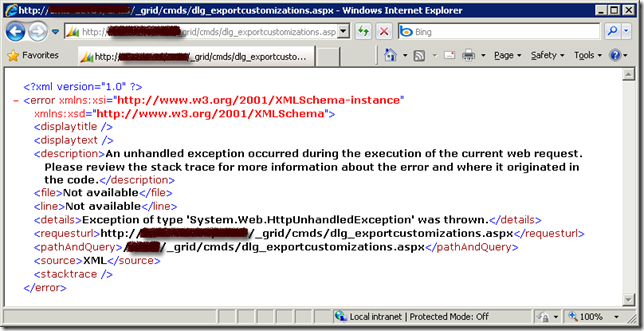
The key message here is , "An unhandled exception occurred during the execution of the current web request. Please review the stack trace for more information about the error and where it originated in the code. "
This is a very generic message that doesn't give me much information about the exception. So I turn on CRM trace log, and what I got from trace log was not much helpful either. It simply says, "System.Reflection.TargetInvocationException: Exception has been thrown by the target of an invocation. ---> System.NullReferenceException: Object reference not set to an instance of an object.".
Microsoft knowledge base article 947096 has given a solution for this error. But I was not able to find any offending attributes by following the instruction. So I had to look for a solution for the error, here is what I have come up after digging information from Google and the CRM forum (The error occurred to me about a month ago, but I just got time to document the solution, I can not find the particular thread any more at the time I am writing this blog post, which is the primary reason that I want to write the blog post since the helpful information is not easy to find, and it was buried in a very long thread).
The cause of the problem is that there is orphan or missing field in your published FormXML which was not documented in the mentioned Microsoft knowledge base article.
Hope this helps if you ever run into the same error.
The key message here is , "An unhandled exception occurred during the execution of the current web request. Please review the stack trace for more information about the error and where it originated in the code. "
This is a very generic message that doesn't give me much information about the exception. So I turn on CRM trace log, and what I got from trace log was not much helpful either. It simply says, "System.Reflection.TargetInvocationException: Exception has been thrown by the target of an invocation. ---> System.NullReferenceException: Object reference not set to an instance of an object.".
Microsoft knowledge base article 947096 has given a solution for this error. But I was not able to find any offending attributes by following the instruction. So I had to look for a solution for the error, here is what I have come up after digging information from Google and the CRM forum (The error occurred to me about a month ago, but I just got time to document the solution, I can not find the particular thread any more at the time I am writing this blog post, which is the primary reason that I want to write the blog post since the helpful information is not easy to find, and it was buried in a very long thread).
- The first thing you need to do is to identify the offending entity if you don't know yet. You may try to utilize the Binary Search algorithm that you have learned in school (or somewhere else) to help you find the entity. The way to work is, you start by publishing the first half set of all CRM entities, if you run into error, then the offending entity must belong to the first half set. If you don't run into any error, then the offending must belong to the second half set. Keep doing this until you find the one. Suppose that we have identified that new_offendingentity is the entity that caused us grief.
- Launch SQL Management Studio and connect to CRM database. (Make sure that you make a full backup of your CRM database before proceeding to next step)
- Identify the culprit CRM fields. In order to identify the columns that ceased the problem, you can execute the following SQL script.
SELECT * FROM OrganizationUIBase
WHERE ObjectTypeCode IN (
    SELECT ObjectTypeCode FROM MetadataSchema.Entity
    WHERE Name='new_offendingentityname'
)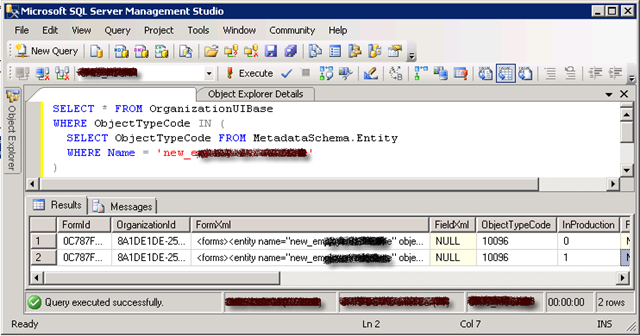
After running the SQL script, you should get two records as shown below. One record has InProduction = 0, another one has InProduction = 1. They basically represent the customization XML that you are drafting, and the customization XML that is already published.The column that should interest you is FormXml (the one has InProduction = 1). You may copy the content of FormXml column to an XML editing tool, such as Visual Studio (you can use Visual Studio formatting tool to make it more readable by pressing Ctrl+K following Ctrl+D), and inspect the XML string. At the same time, you can open your entity's customization page, and navigate to its Attributes page so that you can see all fields that belong to the offending entity. If you look carefully enough, you should be able to find out, one (or more, but most likely one) of CRM fields in the XML is missing from the actual entity customization, which is the cause of the problem. If you cannot determine the offending CRM fields, you should not proceed to next step, in which case you might want to inspect the record that has InProduction = 0, this is where the solution documented in the knowledge base article can come to rescue you.
After you have determined the missing field, you are now ready to take action to correct the issue. - Execute the following SQL script to delete the offending FormXml record that has been published.
DELETE FROM OrganizationUIBase
WHERE ObjectTypeCode IN (
    SELECT ObjectTypeCode FROM MetadataSchema.Entity
    WHERE Name='new_offendingentityname'
)
AND InProduction = 1
- After you have successfully deleted the offending FormXml record, you should now be able to export and publish the customizations of the involved entity.
The cause of the problem is that there is orphan or missing field in your published FormXML which was not documented in the mentioned Microsoft knowledge base article.
Hope this helps if you ever run into the same error.
Subscribe to:
Posts (Atom)


 Posts
Posts


