Showing posts with label MSCRM Client Script. Show all posts

Friday, March 01, 2013

Updated: Microsoft Dynamics CRM 2011 JavaScript Development Cheat Sheet

I just made some updates to CRM 2011 JavaScript Development Cheat Sheet. There are a couple changes in this update to reflect some recent SDK updates.
  • added Xrm.Utility Methods
  • added getClientUrl method
  • marked getAuthenticationHeader and getServerUrl methods as deprecated
Since UR12, getServerUrl is deprecated, and getClientUrl is the recommended approach. To handle the transition, you might want to first check if getClientUrl is available and then use getServerUrl as a second option. This is to ensure backward compatibility, which is important for ISVs. You can see my implementation in the most recent of XrmSvcToolkit.

You may download the cheat sheet document from the following link on my Windows Live SkyDrive.


This may not worth a dedicated blog post, but I thought this is the only way to reach out to the community in order to have your attention.

Please let me know in case I have missed anything important.

Release: XrmSvcToolkit v0.2

It has been a while since the last update of XrmSvcToolkit.

Today, I just updated the library to a new version, v0.2, which includes the following two updates:
  • Cross-browser support
  • Bug fixes for synchronous calls that don't have any return values
So the library should work for CRM 2011 December 2012 Service Update or UR12. 
The new version is available for download at codeplex website. Please let me know if you run into any issues with the new version. 
Hope this helps. 

Wednesday, February 15, 2012

CRM 2011: Get the Right Server URL in Your CRM Client Script

If you have worked with Microsoft Dynamics CRM 2011 long enough, you have most likely used getServerUrl function provided by the platform's API.

However, there is a problem with this function, it returns the base server URL which is the one registered in CRM deployment manager. When you work with a CRM form or web resource, you don't want to use the base server URL directly, instead you need the local server URL that hosts the current form or web resource. For instance, if the user is using a URL which is different from what's in deployment manager, say IP address or a domain alias, the URL will cause cross-domain calls, which will fail.

For this reason, I have baked a solution today which might be able to address this issue universally for all scenarios (hopefully).
var getServerUrl = function () {
    var context, crmServerUrl;
    if (typeof GetGlobalContext != "undefined") {
        context = GetGlobalContext();
    }
    else if (typeof Xrm != "undefined") {
        context = Xrm.Page.context;
    }
    else {
        throw new Error("CRM context is not available.");
    }

    if (context.isOutlookClient() && !context.isOutlookOnline()) {
        crmServerUrl = window.location.protocol + "//" + window.location.host;
    } else {
        crmServerUrl = context.getServerUrl();
        crmServerUrl = crmServerUrl.replace(/^(http|https):\/\/([_a-zA-Z0-9\-\.]+)(:([0-9]{1,5}))?/, window.location.protocol + "//" + window.location.host);
        crmServerUrl = crmServerUrl.replace(/\/$/, ""); // remove trailing slash if any
    }
    return crmServerUrl;
}; 
In the code snippet, I assumed that a server host name can only be made of English, numeric characters, _ (underscore), . (dot), - (dash).

If you are using Silverlight web resource, you need to translate the code to C#, which shouldn't be something difficult. [Update - Please refer to my another blog post for C# code that works for Silverlight]

Although I am bluntly positive that this could solve the problem universally, but there might be exceptional scenarios that I am not currently aware. If that's the case, please let me know by leaving a comment below, I will try to come up with something better. ;-)

Thanks for reading, hope this helps.

Friday, December 02, 2011

MSCRM 2011: Filtered Lookup for "Add Existing..." Button of a CRM N:N View

I have previously documented a way to add lookup filtering capability to MSCRM4 "Add Existing..." button in a CRM N:N view. There was a question in the blog post today about whether this is possible in CRM 2011. So here is this blog post that will walk you through the implementation process.

Prerequisites

To go through the customizations in this blog post, you need to understand how CRM ribbon customization works, and also you need to know how to work with CRM Web Resources and solution export/import functionalities. It should also be noted that this blog post uses CRM Developer Toolkit. In case you are not familiar with the toolkit, you can have a look at my another blog post that illustrates some typical development scenarios which you might find useful. This blog post might be able to demonstrate you how the toolkit can help improve your productivity when developing CRM scripts.

Business Scenario

Let's say we have a custom entity called Project, which has a many-to-many relationship to CRM account entity. In Project entity form, I added a sub-grid which points to account entity, as shown below.


In the above screen, we have a Add Existing Button when the sub-grid is selected. When the button is clicked, we will be prompted the lookup entity's default Lookup View, as shown below.


What we are trying to achieve is to add some filtering capability to the "Add Existing ..." button so CRM only shows the account records that we are interested.

Let's get started.


Steps

Step 1: Create CRM JavaScript Web Resources

  1. In Visual Studio 2010, create a CRM project. (Please refer to the blog post that I just mentioned for detailed instructions about how to do this)
  2. In CrmPackage project, right-click WebResouces –> Script (JScript), and choose "Add" –> "New Item" to create a new JavaScript file. Let's call the file Project.js.


  3. Add the following script to the JS file (I borrowed the fetchXml and layoutXml combination from SDK document).
    function addExistingFromSubGridCustom(params) {
    
        var relName = params.gridControl.getParameter("relName"),
            roleOrd = params.gridControl.getParameter("roleOrd"),
            viewId = "{00000000-0000-0000-0000-000000000001}"; // a dummy view ID
        
        var customView = {
            fetchXml: params.fetchXml,
            id: viewId, 
            layoutXml: params.layoutXml,
            name: "Filtered Lookup View",
            recordType: params.gridTypeCode,
            Type: 0
        };
    
        var lookupItems = LookupObjects(null, "multi", params.gridTypeCode, 0, null, "", null, null, null, null, null, null, viewId, [customView]);
        if (lookupItems && lookupItems.items.length > 0) {
            AssociateObjects(crmFormSubmit.crmFormSubmitObjectType.value, crmFormSubmit.crmFormSubmitId.value, params.gridTypeCode, lookupItems, IsNull(roleOrd) || roleOrd == 2, "", relName);
        }
    }
    
    function addExistingFromSubGridAccount(gridTypeCode, gridControl) {
        addExistingFromSubGridCustom({
            gridTypeCode: gridTypeCode,
            gridControl: gridControl,
            fetchXml: "<fetch version='1.0' " +
                           "output-format='xml-platform' " +
                           "mapping='logical'>" +
                       "<entity name='account'>" +
                       "<attribute name='name' />" +
                       "<attribute name='address1_city' />" +
                       "<order attribute='name' " +
                               "descending='false' />" +
                       "<filter type='and'>" +
                           "<condition attribute='ownerid' " +
                                       "operator='eq-userid' />" +
                           "<condition attribute='statecode' " +
                                       "operator='eq' " +
                                       "value='0' />" +
                       "</filter>" +
                       "<attribute name='primarycontactid' />" +
                       "<attribute name='telephone1' />" +
                       "<attribute name='accountid' />" +
                       "<link-entity alias='accountprimarycontactidcontactcontactid' " +
                                       "name='contact' " +
                                       "from='contactid' " +
                                       "to='primarycontactid' " +
                                       "link-type='outer' " +
                                       "visible='false'>" +
                           "<attribute name='emailaddress1' />" +
                       "</link-entity>" +
                       "</entity>" +
                   "</fetch>",
            layoutXml: "<grid name='resultset' " +
                                 "object='1' " +
                                 "jump='name' " +
                                 "select='1' " +
                                 "icon='1' " +
                                 "preview='1'>" +
                             "<row name='result' " +
                                  "id='accountid'>" +
                               "<cell name='name' " +
                                     "width='300' />" +
                               "<cell name='telephone1' " +
                                     "width='100' />" +
                               "<cell name='address1_city' " +
                                     "width='100' />" +
                               "<cell name='primarycontactid' " +
                                     "width='150' />" +
                               "<cell name='accountprimarycontactidcontactcontactid.emailaddress1' " +
                                     "width='150' " +
                                     "disableSorting='1' />" +
                             "</row>" +
                           "</grid>"
    
        });
    }
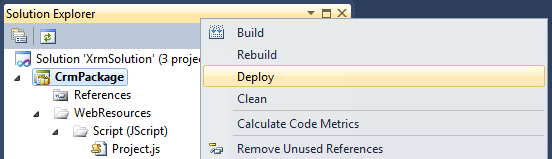
  4. After the script has been saved, you can right click CrmPackage project in Visual Studio Solution Explorer window, and choose "Deploy" to deploy the script to CRM Server. In our case, we will have a Web Resource in CRM called new_Project.

Step 2: Customize CRM Ribbon to Hook up the JS Function

  1. In CRM, create a new solution, and add account entity (the entity in the sub-grid) to the solution.
  2. Export the solution to a .zip file, and extract the file somewhere in your local file system.
  3. Open the customizations.xml from the extracted file, and locate RibbonDiffXml section in the file, under the account entity.


          <RibbonDiffXml>
            <CustomActions />
            <Templates>
              <RibbonTemplates Id="Mscrm.Templates"></RibbonTemplates>
            </Templates>
            <CommandDefinitions />
            <RuleDefinitions>
              <TabDisplayRules />
              <DisplayRules />
              <EnableRules />
            </RuleDefinitions>
            <LocLabels />
          </RibbonDiffXml>
  4. What we need to change is the CommandDefinitions part, which we can get the template code from applicationribbon.xml file (or <entityname>ribbon.xml if it's a system entity) in CRM SDK's resources\exportedribbonxml folder. 
  5. In applicationribbon.xml file (or <entityname>ribbon.xml), locate <CommandDefinition Id="Mscrm.AddExistingRecordFromSubGridAssociated"> line (You can search by addExistingFromSubGridAssociated to get there).
  6. Copy the xml content under <CommandDefinition Id="Mscrm.AddExistingRecordFromSubGridAssociated"> (including itself and its closing tag as well) to the customizations.xml file, so it should look like this.
  7. Modify the JavaScriptFunction part to point to the custom JS function that we previously developed, so it should be something like this:


    The following is the final customization xml.
      <CommandDefinition Id="Mscrm.AddExistingRecordFromSubGridAssociated">
        <EnableRules>
          <EnableRule Id="Mscrm.AppendPrimary" />
          <EnableRule Id="Mscrm.AppendToPrimary" />
          <EnableRule Id="Mscrm.EntityFormIsEnabled" />
        </EnableRules>
        <DisplayRules>
          <DisplayRule Id="Mscrm.AddExisting" />
          <DisplayRule Id="Mscrm.ShowForManyToManyGrids" />
          <DisplayRule Id="Mscrm.AppendPrimary" />
          <DisplayRule Id="Mscrm.AppendToPrimary" />
          <DisplayRule Id="Mscrm.AppendSelected" />
          <DisplayRule Id="Mscrm.AppendToSelected" />
          <DisplayRule Id="Mscrm.CanWriteSelected" />
        </DisplayRules>
        <Actions>
          <JavaScriptFunction FunctionName="addExistingFromSubGridAccount" Library="$webresource:new_Project">
            <CrmParameter Value="SelectedEntityTypeCode" />
            <CrmParameter Value="SelectedControl" />
          </JavaScriptFunction>
        </Actions>
      </CommandDefinition>
    Note that your JS webresource name could be in different format. You can find out that by openning the web resource in CRM, which tells you the path to the web resource file.

  8. Save the file, and zip it back to the original solution export file.
  9. Import the solution file, and publish changes. If everything goes OK, you will see a filtered lookup like the following.

Final Notes

  1. This is an unsupported customization, since we are using undocumented CRM built-in JS functions.
  2. addExistingFromSubGridCustom function is a re-usable function which is what you really need. addExistingFromSubGridAccount function is the actual one that's going to be called in your ribbon command button's customization.
  3. The filter that I have implemented didn't use any context information (such a field value) on the CRM form, you can easily add this in the function when constructing the fetchXml string, if desired.
  4. The above change will apply to all account subgrid regardless of the hosting entity. It should be possible to handle it differently by getting some context information from the form, or probably pass some extra information to the function.
  5. The code didn't have much comments, but hopefully the sample has provided enough information for you to start with.
By the way, an off-topic note, this blog has just reached 100K page views today. It took almost two years to reach 50K pageviews last time, but it only takes a few months to reach another one, although I don't currently produce as many posts as I did in the beginning of my blogging adventure. Good to see the growth of the CRM community.

Hope this helps.

Saturday, April 09, 2011

Microsoft Dynamics CRM 2011 JavaScript Development Cheat Sheet

Microsoft Dynamics CRM 2011 has dramatically changed the JavaScript programming experience when compared to CRM4. So I thought a cheat sheet (or a quick reference document) would help myself get familiar with the latest programming interface. You may download it from the following link on my Windows Live SkyDrive. (Also available at Google Site).


On a side note, some of you may have been curious about (or possibly somehow frustrated by) such API level changes made by MSCRM team in CRM v2011. I think the changes are made for good reasons.
  1. The first motivation is really about the industry standard of JavaScript development. In CRM 4, we use crmForm.all.xxx syntax everywhere, which is really convenient. But it is actually against the best practice in JavaScript development, as this technique is not supported by any other browsers. You may think that CRM2011 is only supported by IE at this moment anyway, why would I care about any other browsers. You are right, CRM2011 is not a cross-browser application, but it doesn't mean that is going to be the case forever. I am relatively confident that the next MSCRM will be a cross-browser one. In fact, I had a close look of some CRM 2011 JavaScript code the other day, I was under the impression that CRM team (probably part of the team) might have tried to make MSCRM 2011 a cross-browser one, but they didn't make the cut for some reasons.
  2. The new CRM 2011 library provides a lot more richer API than CRM4. So we shall require less hacking code if we can take full advantage of the new library, which makes our code more compatible with the future versions.
Note that this cheat sheet primarily focused on the development of CRM form scripts. It didn't cover all aspects of CRM client development practice. If you need a more comprehensive reference of CRM 2011 development practice, SDK document (Download Link) is the best resource available.

As a final note, you should quit using crmForm.all.xxx syntax in CRM 2011 if you are still doing so. ;-)

I hope the cheat sheet useful, and it worths a small spot on your cubicle wall(s). ;-)

[Update - Jun 6, 2011] I uploaded a new version with many fixes of the problems caused by copy/paste. I didn't realize the problems until last week, mainly because I don't work with CRM on day-to-day basis. Sorry for the inconvenience.

Tuesday, February 08, 2011

MSCRM 4.0: Filtered Lookup for "Add Existing..." Button of a CRM N:N View

There has been a question on CRM Development Forum today about whether it's possible to implement a many to many filter lookup functionality.

About one and half years ago, I blogged an approach to implement filtering functionality for lookup fields on CRM form, using George Doubinski's invention. Today, I am going to take this approach one step further, and show you how to apply the same technique to achieve our purpose for a CRM associated view that represents a many-to-many relationship. The CRM form and its associated view could be something similar to the following screenshot.

NN Lookup Filter Form

In the above scrren, I made up a custom entity called Project, which has a N:N relationship with Account entity. My requirement is to only show the account records that have an industry code of "Service Retail" (Again, this is what I came up, your story could be entirely different).

Since I have previously documented how to load CRM associated view in an iframe, I am not going to repeat the same code here.

The following is the procedure that you may follow to implement the aforementioned N:N filtering lookup, which is fairly similar to the filtering functionality for lookup fields on CRM form:

  1. Create a subfolder called CustomLookup under your CRMWeb's ISV folder.
  2. Copy <crmweb folder>\_controls\lookup\lookupsingle.aspx page to your ISV\CustomLookup folder which you have just created, and renamed the file to lookupmulti.aspx.
  3. Add the following script tag to <crmweb folder>\ISV\CustomLookup\lookupmulti.aspx (Please thank George for his code, this is basically a copy from his snippet with one extra line that I added to enable multi-select).   
    <%--
    ********************************** BEGIN: Custom Changes **********************************
    This page is a copy of <crmweb folder>\_controls\lookup\lookupsingle.aspx file 
    with the following custom change. 
    --%>
    <script runat="server"> 
    protected override void OnLoad( EventArgs e ) 
    { 
          base.OnLoad(e); 
          crmGrid.PreRender += new EventHandler( crmgrid_PreRender ); 
    } 
    
    void crmgrid_PreRender( object sender , EventArgs e ) 
    {
        // As we don't want to break any other lookups, ensure that we use workaround only if
        // search parameter set to fetch xml.
        if (crmGrid.Parameters["search"] != null && crmGrid.Parameters["search"].StartsWith("<fetch")) 
        { 
            crmGrid.Parameters.Add("fetchxml", crmGrid.Parameters["search"]);  
    
            // searchvalue needs to be removed as it's typically set to a wildcard '*' 
            crmGrid.Parameters.Remove("searchvalue");
    
            // Allow multi-select
            crmGrid.MaximumSelectableItems = -1;
    
            // Icing on a cake - ensure that user cannot create new new record from the lookup window
            this._showNewButton = false; 
        } 
    }
    </script> 
    <%--
    ********************************** END: Custom Changes **********************************
    --%>

  4. Use the script in my previous blog post to load the associated view in iframe. The script should be added to your CRM form's onload event.
  5. Then you are ready to add filtering criteria to your many-to-many associated view lookup button. In my case, my requirement is to only show the account records that have an industry code of "Service Retail" (its picklist integer value is 25) as I have just mentioned above.
    getFilteredUrlForAddExistingAccountButton = function(lookupUrl) {
        var iframe = crmForm.all.IFRAME_Accounts; // Change IFRAME_Accounts to your iframe's ID
        var crmGrid = iframe.contentWindow.document.all['crmGrid'];
        
        // If it's not N:N lookup dialog, we skip it. 
        if (lookupUrl.toLowerCase().match(/\/_controls\/lookup\/lookupmulti.aspx/i) == null)
            return lookupUrl;
        
        // If the lookup window is not concerned with the entity that we are interested in, we skip as well
        if (GetQueryString(lookupUrl, 'objecttypes') !== crmGrid.GetParameter('otc'))
            return lookupUrl;
    
        lookupUrl = lookupUrl.replace(/\/_controls\/lookup\/lookupmulti.aspx/i, '/ISV/CustomLookup/lookupmulti.aspx'); 
        
        var filterXml =
    '<fetch mapping="logical">' +
       '<entity name="account">' +
          '<filter>' +
             '<condition attribute="industrycode" operator="eq" value="25" />' + // Industry: Service Retail
          '</filter>' +
       '</entity>' +
    '</fetch>';
    
        // Ensure that search box is not available in the lookup dialog
        lookupUrl = SetQueryString(lookupUrl, 'browse', 1);
        lookupUrl = SetQueryString(lookupUrl, 'ShowNewButton', 0);
        lookupUrl = SetQueryString(lookupUrl, 'search', filterXml);
    
        return lookupUrl;
    };

  6. Add the following immediate JavaScript function to your form's onload event, following the above script
    (function replaceCrmLookups() {
        window.oldOpenStdDlg = window.oldOpenStdDlg || window.openStdDlg;
        window.openStdDlg = function() {
            arguments[0] = getFilteredUrlForAddExistingAccountButton(arguments[0]);
            return oldOpenStdDlg.apply(this, arguments);
        };
    })();

  7. Save your form and publish your entity, you are good to go now.

    In my case, after I have everything published, my "Add Existing Account" now prompts me the following screen. As you can tell, I intentionally changed the default many-to-may lookup dialog to the single lookup dialog, which is usually considered to be much more user friendly. I believe we have just shot two birds with one stone, isn't that something beautiful?
    CRM Single Lookup Dialog

Note that you should change the iframe ID in the first line of getFilteredUrlForAddExistingAccountButton() function, also ensure that you have constructed filterXml string correctly in the same function.

I hope this helps.

Sunday, July 04, 2010

Release: MSCRM4 Web Service Toolkit for JavaScript v2.1

Today I am pleased to announce the release of CRM Web Service Toolkit for JavaScript v2.1. The new release includes the following enhancements:
  • All the major functions now support asynchronous calls through an optional callback function parameter. When the callback function is provided, the toolkit will perform an asynchronous service call, otherwise it would be a synchronous call. 
  • A new function setState has been added to the toolkit, which allows you to update a CRM record's status.
  • Two functions (associate, disassociate) have been added to the toolkit, which you can use to associate or disassociate two CRM records that have an N:N relationship. 
  • The signature of queryByAttribute function has been changed, so it takes one parameters now, instead of a bunch of optional parameters in previous version.
In order to make use of the toolkit, you can refer to my previous release page for sample code of all major functions.

Here are a few additional samples that can help you get up to speed with the new release.
  1. Use the optional asynchronous callback function. As just mentioned, all major functions now support asynchronous calls. The asynchronous callback function should take single parameter which is whatever you are expecting to get by using the synchronous call. For instance, if you make an asynchronous call to CrmServiceToolkit.Fetch() method, your callback function should be dealing with the fetch result which is an array of BusinessEntity as the single parameter. Here is a quick sample.
    // callback function
    function fetchCallback(fetchedContacts) {
        alert(fetchedContacts.length);
        alert(fetchedContacts[0].getValue('lastname'));        
        alert(fetchedContacts[0].getValue('creditlimit'));
        alert(fetchedContacts[0].getValue('creditlimit', 'formattedvalue'));
        alert(fetchedContacts[0].getValue('birthdate'));
    };
    
    // Fetch all contact records whose first name is John using FetchXML query
    var firstname = 'John';
    var fetchXml = [
    "<fetch mapping='logical'>",
       "<entity name='contact'>",
          "<attribute name='contactid' />",
          "<attribute name='firstname' />",
          "<attribute name='lastname' />",
          "<attribute name='creditlimit' />",
          "<attribute name='birthdate' />",
          "<filter>",
             "<condition attribute='firstname' operator='eq' value='", firstname, "' />",
          "</filter>",
       "</entity>",
    "</fetch>"
    ].join("");
    
    // Use CrmServiceToolkit.Fetch() to make an asynchronous call.
    var fetchedContacts = CrmServiceToolkit.Fetch(fetchXml, fetchCallback);
    
  2. Use CrmServiceToolkit.setState() to update a CRM record's status.
    // Use CrmServiceToolkit.setState() to update a CRM record's status. 
    var contactId = '3210F2BC-1630-EB11-8AB1-0003AAA0123C';
    var response = CrmServiceToolkit.setState('contact', contactId, 'Inactive', 2);
    alert(response);
  3. Use CrmServiceToolkit.associate() to associate two CRM records that have an N:N relationship.
    // Use CrmServiceToolkit.associate() to associate two CRM records that have an N:N relationship. 
    var contactId = '3210F2BC-1630-EB11-8AB1-0003AAA0123C';
    var orderId = '3210F2AF-1630-EB11-8AB1-0003AAA0126A';
    var response = CrmServiceToolkit.associate('contactorders_association', 'contact', contactId, 'salesorder', orderId);
    alert(response);
  4. Use CrmServiceToolkit.disassociate() to disassociate two CRM records that have an N:N relationship.
    // Use CrmServiceToolkit.disassociate() to disassociate two CRM records that have an N:N relationship. 
    var contactId = '3210F2BC-1630-EB11-8AB1-0003AAA0123C';
    var orderId = '3210F2AF-1630-EB11-8AB1-0003AAA0126A';
    var response = CrmServiceToolkit.disassociate('contactorders_association', 'contact', contactId, 'salesorder', orderId);
    alert(response);
  5. Use CrmServiceToolkit.queryByAttribute() to retrieve all CRM records that match the query criteria.
    // Use CrmServiceToolkit.queryByAttribute() to retrieve all CRM records that match the query criteria. 
    var queryOptions = {
        entityName : "contact",
        attributes : ["firstname", "lastname"], // Search by firstname and lastname
        values : ["John", "Smith"], // Find all contacts whose firstname is John, lastname is Smith
        columnSet : ["familystatuscode", "creditlimit", "birthdate"],
        orderby : ["creditlimit", "birthdate"]
    };
    
    var fetchedContacts = CrmServiceToolkit.queryByAttribute(queryOptions);

For all the rest functions, you should be able to find related sample code from my previous release page.

[CREDITS]
  • The idea behind CrmServiceToolkit.BusinessEntity was inspired by Ascentium CrmService JavaScript Library, after I have finished most of version 1.0 coding. Hats off to Ascentium CRM practice team.
  • Thanks to Daniel René Thul for his contribution on the implementation of asynchronous support in this release.
P.S. Please excuse me that I have to break my word in the previous release page, guess this would be the last release before CRM5. :-)

[Update - Oct 16, 2010] A bug fix has been included in the release so that the BusinessEntity can work properly with null value now.

Thursday, July 01, 2010

MSCRM 4.0: Recover "Create New" Button for the Associated View of an Invoiced/Active Contract Record or an Inactive Record of CRM Custom Entity

If you have worked with CRM 4.0 long enough, you might have noticed a behavior designed by CRM team, which is when a CRM record has been deemed to be read only, all its associated views (except the activity ones) will not have any "Create New" or "Add Existing ..." button. For instance, my Contract entity has a one-to-many relationship to a custom entity called Payment. The Payment entity is designed to collect payments from my client for the contract record. When a CRM contract is invoiced or activated, the associated views for the payment entity will not have any "Create New" or "Add Existing ..." button (shown below) as CRM platform has determined that this contract record is no longer a draft one, CRM users are not supposed to create any new child records.

Associated View of Invoiced CRM Contract

This makes sense, but in the case that I have my custom Payment entity involved, I do want to collect and record Payment information as the Contract goes, even after it has been activated or invoiced. Is it possible to have the Create New button back in this case? The answer is YES, you can do it through HTML hack. The following is the script that you can copy to your form’s onLoad event.

/**
 * Recover "New" button in a CRM associated view where the master CRM record is read-only.
 * @author Daniel Cai, http://danielcai.blogspot.com/
 *
 * Parameters:
 * @param navItemId: LHS navigator's HTML element ID of the associated view.
                     It usually starts with "nav".
 * @param relName:   The relationship name that the associated view represents.
 * @param label:     The label of the New button.
 * @param title:     The title of the New button.
 */
 function recoverNewButtonForAssociatedView(navItemId, relName, label, title) {
    var clickActionPattern = /loadArea\(['"]{1}([A-Za-z0-9_]+)['"]{1}\).*/;
    var iframe;

    var recoverNewButton = function() {

        var frameDoc = iframe.contentWindow.document;
        if (!frameDoc) return;

        var grid = frameDoc.all['crmGrid'];
        if (!grid) return;

        var addNewBtnId = formatString('_MBlocAddRelatedToNonForm{0}{1}GUID', grid.GetParameter('otc'), crmForm.ObjectTypeCode);
        var addNewBtn = frameDoc.getElementById(addNewBtnId);
        if (addNewBtn === null)
        {
            var menuBar = frameDoc.getElementById('mnuBar1');
            if (!menuBar) return;
            
            var toolbar = menuBar.childNodes[0].childNodes[0].childNodes[0].childNodes[0];
            
            var html = "<li id=_MBlocAddRelatedToNonForm{0}{1}GUID class=ms-crm-Menu title=\"{3}\" tabIndex=-1 onclick=window.execScript(action) " +
    "action=\"locAddRelatedToNonForm({0},{1},'{2}', '')\">" +
    "<span class=ms-crm-Menu-Label><a class=ms-crm-Menu-Label tabIndex=-1 onclick=\"return false;\" href=\"javascript:onclick();\" target=_self>" +
    "<img class=ms-crm-Menu-ButtonFirst tabIndex=-1 alt=\"{3}\" src=\"/_Common/icon.aspx?objectTypeCode={0}&iconType=DBGridIcon&inProduction=1&cache=1\">" +
    "<span class=ms-crm-MenuItem-TextRTL tabIndex=0>{4}</span></a></span>";
            html = formatString(html, grid.GetParameter('otc'), crmForm.ObjectTypeCode, crmForm.ObjectId, title, label);
            toolbar.innerHTML = html + toolbar.innerHTML;
        }
    };

    var onReadyStateChange = function() {
        if (iframe.readyState === 'complete') {
            recoverNewButton();
        }
    };

    (function init() {
        if (!crmForm.ObjectId) return;

        var navItem = document.getElementById(navItemId);
        if (!navItem) return;

        var clickAction = navItem.getAttributeNode('onclick').nodeValue;
        if (!clickAction || !clickActionPattern.test(clickAction))
            return;

        var areaId = clickAction.replace(clickActionPattern, '$1');

        navItem.onclick = function loadAreaOverride() {
            loadArea(areaId);

            iframe = document.getElementById(areaId + 'Frame');
            if (!iframe) return;

            iframe.attachEvent('onreadystatechange', onReadyStateChange);
        }
    })();
}

To call the above function, you can do something like this.

recoverNewButtonForAssociatedView('nav_new_contract_payment', 'new_contract_payment', 'New Payment', 'Add a new Payment to this record');

If you get everything right, your associated view should look like this:

Associated View of Invoiced CRM Contract with New Button

A few final notes about the script before we go:

  • The script opens up the possibility to create or update information for any CRM record that is read-only, by using a child entity assuming that the user has proper privileges against the child entity.
  • The script should work for any 1-to-many relationship if you have provided navItemId and relName parameters correctly.
  • The script doesn't actually check if the login user has the proper privilege to create new record for the associated entity. The New button will show regardless the current user has the privilege or not, but the CRM platform should prohibit Save happening if the user doesn't actually have the Create privilege for the associated child entity.
  • Undocumented CRM JavaScript function formatString was used to make the code easier to read.
  • The script doesn't look very pretty due to the lengthy HTML code, but it should be quite readable, in my humble opinion.  :-)

Hope this helps.

P.S. This blog post is actually a response to a question on CRM Development Forum.

Tuesday, May 25, 2010

Use CRM Web Service Toolkit to Implement Associate/Disassociate/SetState Functions

There was a comment in my new CRM Web Service Toolkit release page, complaining the following functions were missing from the toolkit when comparing to Ascentium library.

- Associate
- Disassociate
- SetState

I want to make it very clear upfront. It was never my intention to beat anyone or anything by writing the toolkit. I wrote it simply because I had too much pain to write ad-hoc JavaScript functions to make CRM Web Service calls. It was very inefficient, and also error-prone.

If any of you ever care about how and why it happened, here is a bit story behind the toolkit. I started with a few reusable JavaScript functions at the very beginning, without knowing Ascentium library exists (If I knew in the first place, I would probably never started), and gradually made it into a helper utility. To be honest, it took me quite some effort to get there, as I was an amateur JavaScript developer. I liked most of the implementation, but it was too simple, can only do a couple of things. So I decided to make it better, that's how CRM Service Toolkit 1.0 was born, which killed me almost another whole weekend time plus some evening time during that week, it was the time that I came cross Ascentium library, from which I incorporated the self-contained BusinessEntity concept. The toolkit looked a lot better, but since it's my spare time hobby project, I didn't actually bring the toolkit to my work project until almost 3 months later due to time constraint and distraction of other engagements. As soon as I started to use it in my work project, I immediately realized some problems, most significantly, adding toBoolean() prototype function to JavaScript Number object was simply a wrong decision. That's the biggest motivation for me to write a 2.0 version, as I feel obliged that I have to address this bad design. In the meantime, I wanted to incorporate some security features to the toolkit as they are very often used in CRM projects. That's where v2.0 came from. But since I can only do it on my personal time, it took me roughly a month to find some spare time to really focus on the v2.0 enhancements.

Way off-topic, I just want to make it clear about my intention of writing the toolkit.

Back to the topic of those missing functions, I actually thought about introducing them to the toolkit library, but I decided not to do so, in order to keep the toolkit as nimble as possible, I didn't seem to see they are so often used.

However if you ever need those functions, here are the implementations:

Associate and Disassociate Functions

/**
 * Associate two CRM records that have a N:N relationship. 
 * @param {String} relationshipName Name of the many-to-many relationship.
 * @param {String} entity1Name Entitiy name of the first record to be associated.
 * @param {String} entity1Id CRM Record ID (GUID) of the first record to be associated.
 * @param {String} entity2Name Entitiy name of the second record to be associated.
 * @param {String} entity2Id CRM Record ID (GUID) of the second record to be associated.
 * @return {object} The XML representation of the result.
 */
associate = function(relationshipName, entity1Name, entity1Id, entity2Name, entity2Id)
{
    var request = [
"<Request xsi:type='AssociateEntitiesRequest'>",
    "<Moniker1>",
        "<Id xmlns='http://schemas.microsoft.com/crm/2006/CoreTypes'>", entity1Id, "</Id>",
        "<Name xmlns='http://schemas.microsoft.com/crm/2006/CoreTypes'>", entity1Name, "</Name>",
    "</Moniker1>",
    "<Moniker2>",
        "<Id xmlns='http://schemas.microsoft.com/crm/2006/CoreTypes'>", entity2Id, "</Id>",
        "<Name xmlns='http://schemas.microsoft.com/crm/2006/CoreTypes'>", entity2Name, "</Name>",
    "</Moniker2>",
    "<RelationshipName>", relationshipName, "</RelationshipName>",
"</Request>"
].join("");

    return CrmServiceToolkit.Execute(request);
};

/**
 * Disassociate two CRM records that have a N:N relationship. 
 * @param {String} relationshipName Name of the many-to-many relationship.
 * @param {String} entity1Name Entitiy name of the first record to be disassociated.
 * @param {String} entity1Id CRM Record ID (GUID) of the first record to be disassociated.
 * @param {String} entity2Name Entitiy name of the second record to be disassociated.
 * @param {String} entity2Id CRM Record ID (GUID) of the second record to be disassociated.
 * @return {object} The XML representation of the result.
 */
disassociate = function(relationshipName, entity1Name, entity1Id, entity2Name, entity2Id) {
    var request = [
"<Request xsi:type='DisassociateEntitiesRequest'>",
    "<Moniker1>",
        "<Name xmlns='http://schemas.microsoft.com/crm/2006/CoreTypes'>", entity1Name, "</Name>",
        "<Id xmlns='http://schemas.microsoft.com/crm/2006/CoreTypes'>", entity1Id, "</Id>",
    "</Moniker1>",
    "<Moniker2>",
        "<Name xmlns='http://schemas.microsoft.com/crm/2006/CoreTypes'>", entity2Name, "</Name>",
        "<Id xmlns='http://schemas.microsoft.com/crm/2006/CoreTypes'>", entity2Id, "</Id>",
    "</Moniker2>",
    "<RelationshipName>", relationshipName, "</RelationshipName>",
"</Request>"
].join("");

    return CrmServiceToolkit.Execute(request);
};

SetState Function

[Update - May 26, 2010] vlad007 left a comment pointing out the request XML was not in right sequence, so I have just updated the script. Thanks vlad007!
/**
 * Set a CRM record's state by its statecode and statuscode. 
 * @param {String} entityName Entitiy name of the CRM record to be updated.
 * @param {String} id CRM Record ID (GUID) to be updated.
 * @param {String} statecode New statecode in string, eg, "Active", "Inactive".
 * @param {Integer} statuscode New statuscode in integer, use -1 for default status.
 * @return {object} The XML representation of the result.
 */
setState = function(entityName, id, stateCode, statusCode) {
    var request = [
"<Request xsi:type='SetStateDynamicEntityRequest'>",
    "<Entity>",
        "<Name xmlns='http://schemas.microsoft.com/crm/2006/CoreTypes'>", entityName, "</Name>",
        "<Id xmlns='http://schemas.microsoft.com/crm/2006/CoreTypes'>", id, "</Id>",
    "</Entity>",
    "<State>", stateCode, "</State>",
    "<Status>", statusCode, "</Status>",
"</Request>"
].join("");

    return CrmServiceToolkit.Execute(request);
};

Please be advised, those functions were not actually unit tested. Please let me know if you have problems using them.

The above code should also be ablet to give you some basic ideas about how to add support of any other CRM messages that you may need to the toolkit.

Cheers!

Sunday, May 23, 2010

Release: MSCRM4 Web Service Toolkit for JavaScript v2.0

[UPDATE - July 4, 2010] A new version has been released at http://danielcai.blogspot.com/2010/07/crm-web-service-toolkit-for-javascript.html, please ensure to check out.

Here is another update of CRM Web Service Toolkit for JavaScript that I released to codeplex site today, most likely this is going to be the last release before CRM5. This new release is based on previous version (v1.0), and it comes with a few more enhancements:
  1. A new method called queryByAttribute() has been added, which allows to retrieve a specific entity's record by using one or more than one pair of attribute and value
  2. Three new methods have been added to help facilitate user and user security role related queries, including getCurrentUserId(), getCurrentUserRoles(), isCurrentUserInRole()
  3. The toBoolean() prototype function that I added to JavaScript Number type in the previous version is now obsolete, instead I have added a new prototype function to the toolkit's BusinessEntity object. So if you want to retrieve a CRM Boolean type field's value, you should use something like this: businessEntity.getValueAsBoolean('new_mybooleanfield')
  4. A new prototype function called getValueAsLookup has been added to the toolkit's BusinessEntity object, which allows you to parse the values of a CRM lookup field that you retrieved through the toolkit and convert it to a CRM lookup control's DataValue. For instance, you could do something like this: crmForm.all.new_mylookup.DataValue = businessEntity.getValueAsLookup("new_mylookup", "new_mylookupentity")
Again, here are a few samples that might help you get started with the toolkit.
  1. Use CrmServiceToolkit.Create() to create a CRM record.
    // Use CrmServiceToolkit. Create() to create a CRM contact record.
    var contact = new CrmServiceToolkit.BusinessEntity("contact");
    contact.attributes["firstname"] = "Diane";
    contact.attributes["lastname"] = "Morgan";
    contact.attributes["gendercode"] = 2;
    contact.attributes["familystatuscode"] = 1; // Picklist : Single - 1
    contact.attributes["creditlimit"] = 3000;
    
    var createResponse = CrmServiceToolkit.Create(contact);
  2. Use CrmServiceToolkit.Update() to update a CRM record.
    //Use CrmServiceToolkit.Update() to update a CRM contact record. 
    var contactId = '3210F2BC-1630-EB11-8AB1-0003AAA0123C';
    var contact = new CrmServiceToolkit.BusinessEntity("contact");
    contact.attributes["contactid"] = contactId;
    contact.attributes["firstname"] = "Diane";
    contact.attributes["lastname"] = "Lopez";
    contact.attributes["familystatuscode"] = 2; // Married
    
    var updateResponse = CrmServiceToolkit.Update(contact);   
  3. Use CrmServiceToolkit.Retrieve() to retrieve a CRM record.
    // Use CrmServiceToolkit.Retrieve() to retrieve a CRM contact record.
    var contactId = '3210F2BC-1630-EB11-8AB1-0003AAA0123C'; 
    var cols = ["firstname", "lastname", "familystatuscode", "creditlimit", "birthdate", "donotemail"];
    var retrievedContact = CrmServiceToolkit.Retrieve("contact", contactId, cols);
    
    alert(retrievedContact.getValue('lastname'));
    alert(retrievedContact.getValue('firstname'));
    alert(retrievedContact.getValue('familystatuscode')); // Picklist's value (integer)
    alert(retrievedContact.getValue('familystatuscode', 'name')); // Picklist's selected text
    alert(retrievedContact.getValue('creditlimit')); // Currency field's value
    alert(retrievedContact.getValue('creditlimit', 'formattedvalue')); // Currency field's formatted value (string)
    alert(retrievedContact.getValue('birthdate')); // Datetime field's date/time value
    alert(retrievedContact.getValue('birthdate', 'date')); // Datetime field's date string
    alert(retrievedContact.getValue('birthdate', 'time')); // Datetime field's time string
    alert(retrievedContact.getValueAsBoolean('donotemail')); // Bit field's value
  4. Use CrmServiceToolkit.RetrieveMultiple() to retrieve a collection of CRM records.
    // Retrieve all contacts whose first name is John. 
    var firstname = 'John'; 
    var query = [
    "<q1:EntityName>contact</q1:EntityName>",
    "<q1:ColumnSet xsi:type='q1:ColumnSet'>",
       "<q1:Attributes>",
          "<q1:Attribute>firstname</q1:Attribute>",
          "<q1:Attribute>lastname</q1:Attribute>",
          "<q1:Attribute>familystatuscode</q1:Attribute>",
          "<q1:Attribute>ownerid</q1:Attribute>",
          "<q1:Attribute>creditlimit</q1:Attribute>",
          "<q1:Attribute>birthdate</q1:Attribute>",
          "<q1:Attribute>donotemail</q1:Attribute>",
       "</q1:Attributes>",
    "</q1:ColumnSet>",
    "<q1:Distinct>false</q1:Distinct>",
    "<q1:Criteria>",
       "<q1:FilterOperator>And</q1:FilterOperator>",
       "<q1:Conditions>",
          "<q1:Condition>",
             "<q1:AttributeName>firstname</q1:AttributeName>",
             "<q1:Operator>Equal</q1:Operator>",
             "<q1:Values>",
                "<q1:Value xsi:type='xsd:string'>", firstname, "</q1:Value>",
             "</q1:Values>",
          "</q1:Condition>",
       "</q1:Conditions>",
    "</q1:Criteria>"
    ].join("");
    
    var retrievedContacts = CrmServiceToolkit.RetrieveMultiple(query);
    
    alert(retrievedContacts.length);
    alert(retrievedContacts[0].getValue('lastname'));
    alert(retrievedContacts[0].getValue('firstname'));
    alert(retrievedContacts[0].getValue('familystatuscode');
    alert(retrievedContacts[0].getValue('familystatuscode', 'name'));
    alert(retrievedContacts[0].getValue('creditlimit'));
    alert(retrievedContacts[0].getValue('creditlimit', 'formattedvalue'));
    alert(retrievedContacts[0].getValue('birthdate'));
    alert(retrievedContacts[0].getValue('birthdate', 'date'));
    alert(retrievedContacts[0].getValue('birthdate', 'time'));
    alert(retrievedContacts[0].getValueAsBoolean('donotemail'));
  5. Use CrmServiceToolkit.Fetch() to retrieve a collection of CRM records using FetchXML query.
    // Fetch all contact records whose first name is John using FetchXML query
    var firstname = 'John';
    var fetchXml = [
    "<fetch mapping='logical'>",
       "<entity name='contact'>",
          "<attribute name='contactid' />",
          "<attribute name='firstname' />",
          "<attribute name='lastname' />",
          "<attribute name='familystatuscode' />",
          "<attribute name='ownerid' />",
          "<attribute name='creditlimit' />",
          "<attribute name='birthdate' />",
          "<attribute name='accountrolecode' />",
          "<attribute name='donotemail' />",
          "<filter>",
             "<condition attribute='firstname' operator='eq' value='", firstname, "' />",
          "</filter>",
       "</entity>",
    "</fetch>"
    ].join("");
    
    var fetchedContacts = CrmServiceToolkit.Fetch(fetchXml);
    
    alert(fetchedContacts.length);
    alert(fetchedContacts[0].getValue('lastname'));
    alert(fetchedContacts[0].getValue('firstname'));
    alert(fetchedContacts[0].getValue('familystatuscode');
    alert(fetchedContacts[0].getValue('familystatuscode', 'name'));
    alert(fetchedContacts[0].getValue('creditlimit'));
    alert(fetchedContacts[0].getValue('creditlimit', 'formattedvalue'));
    alert(fetchedContacts[0].getValue('birthdate'));
    alert(fetchedContacts[0].getValue('birthdate', 'date'));
    alert(fetchedContacts[0].getValue('birthdate', 'time'));
    alert(fetchedContacts[0].getValueAsBoolean('donotemail'));
  6. Use CrmServiceToolkit.Delete() to delete a CRM record.
    // Use CrmServiceToolkit.Delete() to delete a CRM contact record. 
    var contactId = '3210F2BC-1630-EB11-8AB1-0003AAA0123C';
    var deleteResponse = CrmServiceToolkit.Delete("contact", contactId);
    alert(deleteResponse);
  7. Use CrmServiceToolkit.Execute() to execute a message.
    // Use CrmServiceToolkit.Execute() to execute a message. 
    var whoAmI = CrmServiceToolkit.Execute("<Request xsi:type='WhoAmIRequest' />");
    currentUserId = whoAmI.getElementsByTagName("UserId")[0].childNodes[0].nodeValue;
    alert("Current user's ID is " + currentUserId);
  8. Use CrmServiceToolkit.queryByAttribute() to retrieve a CRM record using one criterion.
    // Use CrmServiceToolkit.queryByAttribute() to retrieve a set of CRM records.
    var retrievedContacts = CrmServiceToolkit.queryByAttribute("contact", "firstname", "John"); // Retrieve all contacts whose first name is John.
    
    alert(retrievedContacts[0].getValue('lastname'));
    alert(retrievedContacts[0].getValue('firstname'));
    NOTE: In this example, I didn't specify columnSet parameter, so it will return all available fields of the contact entity, which is a really BAD practice. You should always specify what you want to get, if that's possible.

    NOTE: The signature of this method has been changed in v2.1, please refer to the latest release page if you are using v2.1.

  9. Use CrmServiceToolkit.queryByAttribute() to retrieve a CRM record using more than one criterion, with specified column set and sorting order.
    // Use CrmServiceToolkit.queryByAttribute() to retrieve a set of CRM records using more than one criterion with specified column set or sorting order
    var attributes = ["firstname", "lastname"];
    var values = ["John", "Wayne"];
    var cols = ["familystatuscode", "ownerid", "creditlimit", "birthdate", "donotemail", "donotphone"];
    var orderby = ["jobtitle"]; // Sort by Job Title
    var retrievedContacts = CrmServiceToolkit.queryByAttribute("contact", attributes, values, cols, orderby);
    
    alert(retrievedContacts[0].getValue('middlename'));
    NOTE: Again, the signature of this method has been changed in v2.1, please refer to the latest release page if you are using v2.1.

  10. Use CrmServiceToolkit.getCurrentUserId() to get the current user's ID.
    // Use CrmServiceToolkit.getCurrentUserId() to get the current user's ID.
    var currentUserId = CrmServiceToolkit.getCurrentUserId();
    
    alert(currentUserId);
  11. Use CrmServiceToolkit.getCurrentUserRoles() to get all the system roles that the current user has been assigned to.
    // Use CrmServiceToolkit.getCurrentUserRoles() to get all the system roles that the current user has been assigned to.
    var roles = CrmServiceToolkit.getCurrentUserRoles();
    
    alert(roles[0]); // Prompt the user's first role. 
  12. Use CrmServiceToolkit.isCurrentUserInRole() to check if the current user has a particular role.
    // Use CrmServiceToolkit.isCurrentUserInRole() to check if the current user has a particular role.
    var isSystemAdministrator = CrmServiceToolkit.isCurrentUserInRole("System Administrator");
    
    alert("I " + (isSystemAdministrator ? "AM" : "AM NOT") + " a System Administrator. "); 
As usual, here are a few notes about using the toolkit.
  1. The following CRM JavaScript functions have been used in order to keep the file size minimal (Aside from this reason, I am not a big fan of reinventing the wheel).
    • GenerateAuthenticationHeader() function
    • _HtmlEncode() function
    • CrmEncodeDecode.CrmXmlDecode() function
    • CrmEncodeDecode.CrmXmlEecode() function

    If you ever need to run the toolkit out of the context of a CRM form, you'll need to make the above functions available to the toolkit script.

  2. When you retrieve records from CRM using the toolkit's Fetch, Retrieve, RetrieveMultiple, or the new queryByAttribute methods, what you get will be the instance(s) of CrmServiceToolkit.BusinessEntity, which contains all CRM attributes (fields) that have been returned from CRM. However, you should not try to access those attributes directly, instead you use the instance function - getValue() or getValueAsBoolean() to get the value of the CRM field. The reason behind this is, CRM doesn't return anything if a field's value is null, in which case your JS code will blow up if you try to access the field (attribute) directly. With that being said, you should also be informed that a CRM filed's value could be null, be sure to handle it properly in your JS code.
  3. As mentioned previously, when dealing with the value of CRM bit data type that you have retrieved from CRM (Only Fetch, Retrieve, RetrieveMultiple, queryByAttribute methods are really concerned), you should use getValueAsBoolean() method to get the value. This seems to be the only field type that the toolkit cannot detect correctly. For all other type of CRM fields, you can pretty much use getValue() instance method to do the job.
  4. The toolkit will throw error if the CRM service calls failed with any exceptions, it's always a good idea to use try/catch block to manage the potential errors. An example would be:
    // It's always a good idea to contain any errors that could be thrown be the toolkit.
    try
    {
        var contactId = '3210F2BC-1630-EB11-8AB1-0003AAA0123C'; 
        var cols = ["firstname", "lastname", "familystatuscode", "creditlimit", "birthdate", "donotemail"];
        var retrievedContact = CrmServiceToolkit.Retrieve("contact", contactId, cols);
    
        // Do the rest of work
    }
    catch(err) {
        var errMsg = "There was an error when retrieving the contact information...\n\n";
        errMsg += "Error: " + err.description + "\n";
        alert(errMsg);
    }
  5. CRM's Execute message is a versatile message. Anything that you cannot easily achieve through the other 6 messages, you should resort to the toolkit’s Execute() method. Again, please refer to MSCRM 4.0 SDK for more CRM messages.
  6. The toolkit release has a test page included (CrmServiceToolkitTest.aspx), which utilizes QUnit as the test engine. In order to run the test script, you should deploy it along with all other files to ISV/CrmServiceToolkit folder (Please create this folder first), then you can launch http://crmserver:port/MyOrgName/ISV/CrmServiceToolkit/CrmServiceToolkitTest.aspx to run it. If you are in good luck, you should see a screen like this:
    CrmWebServiceToolkit2Test
    NOTE: The unit tests will actually write a contact record to your CRM database, and it will be deleted as part of the unit tests. 
I hope that I have covered everything.

[CREDITS] The idea behind CrmServiceToolkit.BusinessEntity was inspired by Ascentium CrmService JavaScript Library, after I have finished most of version 1.0 coding. Hats off to Ascentium CRM practice team.

P.S. You should probably have noticed that I have repeated most of the content in my previous toolkit release page, the reason is that I want to provide a single updated page for you to have all the information, so you don't have to go back and forth between the old release page and this release page.

Have fun with the toolkit, hope the toolkit can help you become a more productive CRM developper.

[UPDATE - July 4, 2010] A new version has been released at http://danielcai.blogspot.com/2010/07/crm-web-service-toolkit-for-javascript.html, please ensure to check out.

Monday, May 03, 2010

MSCRM 4.0: Adding a Button to a Form Toolbar using Client Script

Usually we add custom button to CRM form through ISV.config customization, but there could be scenarios that you may want to add button on-fly in the form’s onLoad event. Here is the script that just does this job.
/**
 * Add a Button to a CRM4.0 form toolbar using client script.
 * @author Daniel Cai, http://danielcai.blogspot.com/
 */
function createToolbarButton(btnTitle, btnId, clickAction, imagePath, btnLabel, includeSpacer) {
    var toolbar = document.all.mnuBar1.rows(0).cells(0).childNodes[0];
    var html = (!includeSpacer) ? '' : '<li class="ms-crm-Menu-Spacer" tabIndex="-1">&nbsp;<img style="clip: rect(0px 4px 17px 0px); background-image: url(/_imgs/imagestrips/control_imgs_1.gif); width: 4px; background-position-y: -55px; height: 17px" alt="" src="/_imgs/imagestrips/transparent_spacer.gif"></li>';
    html += '<li id="' + btnId + '" + class="ms-crm-Menu" title="' + btnTitle + '" tabIndex="-1" onclick="window.execScript(action)" action="' + clickAction + '">';
    html += '<span class="ms-crm-Menu-Label"><a class="ms-crm-Menu-Label" tabIndex=-1 onclick="return false;" href="javascript:onclick();" target=_self>';
    html += (!imagePath) ? '' : '<img class="ms-crm-Menu-ButtonFirst" tabIndex="-1" alt="' + btnTitle + '" src="' + imagePath + '" />';
    html += '<span class="ms-crm-MenuItem-TextRTL" tabIndex=0>' + btnLabel + '</span></a></span>';
    
    toolbar.insertAdjacentHTML("beforeEnd", html);
}
To call the script, you may simply do this:
createToolbarButton("Test button", "mybuttonid", "myfunc()", "/_imgs/ico_16_4200.gif", "Test button label", true);
The code looks a little messy due to its lengthy html code, but once you have pasted to your file, it shouldn't look too bad. :-)

The parameters that the function accepts are all self-explanatory, hope you can figure out without requiring much explanation.

By the way, this is a re-post of my response to a question on CRM Development Forum.

Cheers!

Wednesday, April 21, 2010

MSCRM 4.0: Hide Duplicate Titles of CRM Notes Field

There was a question on CRM Development Forum about how to hide one of the titles of CRM notes field. The requirement is to make it looks like something as below.

Before hiding:

HideNotesTitle1

After hiding the titles:

HideNotesTitle

Here is the script that I came up.

(function hideNotesTitle() {
    var notesField = crmForm.all.notescontrol;
    if (!notesField) return;  // there is no notes field on current form

    var onReadyStateChange = function() {
        if (notesField.readyState === 'complete') {
            var notesDoc = notesField.contentWindow.document;
            var notesTable = notesDoc.getElementById("NotesTable");
            var notesTableBody = notesTable.childNodes[1];

            for (var i = 0, len = notesTableBody.childNodes.length; i < len; i++) {
                var row = notesTableBody.childNodes[i];
                if (row.className == "noteHeader" && !row.oId) {
                    row.style.display = "none";
                }
            }

            notesField.detachEvent('onreadystatechange', onReadyStateChange);
        }
    };

    notesField.attachEvent('onreadystatechange', onReadyStateChange);
})();

To use the function, you simply copy the code to your CRM form's OnLoad event.

Hope this snippet gives you some idea about how to work with CRM notes field if you ever need to do something similar.

Cheers!

Sunday, April 18, 2010

MSCRM 4.0: Get CRM Report's ID by its Name

There has been a question on CRM Development Forum about how to get a CRM report's ID by its name. Here is the script that I came up using CRM Web Service Toolkit.
/**
* Get a CRM report's ID by its name.
* @author Daniel Cai, http://danielcai.blogspot.com/
*
* Parameters:
* @param reportName: The CRM Report's name. 
*/
getReportId = function(reportName)
{
    var fetchXml = [
        "<fetch mapping='logical'>",
           "<entity name='report'>",
           "<attribute name='reportid' />",
           "<filter>",
              "<condition attribute='name' operator='eq' value='", reportName, "' />",
           "</filter>",
           "</entity>",
        "</fetch>"
    ].join("");

    var result = CrmServiceToolkit.Fetch(fetchXml);
    if (result === null) {
        throw new Error("Report " + reportName + " cannot be found. "); // This should never happen if the report exists, but you should handle the exception just in case.
    }

    return result[0].getValue("reportid");
};
To use the function, you simply call it with the report's name as the only parameter, e.g.
var reportId = getReportId("Quote"); // Get "Quote" report's GUID
You will have to make CRM Web Service Toolkit available on the form. You can either copy the toolkit's JS code to your form's OnLoad event, or use my another piece of script to load the toolkit from external file.

You may wonder why you ever need this function. The reason is, when you have a custom report built for a CRM entity, and you want to add a custom button on the entity form to launch the report instantly, in which case you will need to call CRM's RunReport() function, which takes report's GUID as the last parameter (sHelpId). When a custom report is downloaded/uploaded from one environment to another one, the report's ID would be different. If you won't want to hard-code your report's ID when you make call to CRM RunReport() function, it is when this function comes to rescue you.

Cheers.

Tuesday, April 06, 2010

MSCRM 4.0: Disable All Fields on a CRM Form Tab

There has been a question on CRM Development Forum about how to make all CRM fields read only on a CRM form tab. Here is the script that I just came up.
/**
 * Disable all CRM fields on a CRM form's tab.
 * @author Daniel Cai, http://danielcai.blogspot.com/
 *
 * Parameters:
 * @param tabIndex: The index number of the tab that you want to disable the 
 *                  CRM fields. It's a zero-based number. 
 */
function disableTab(tabIndex) {
    var tab = document.all["tab" + tabIndex];

    for (var i = 0; i < tab.all.length; i++) {
        if (tab.all[i].Disabled !== undefined) {
            tab.all[i].Disabled = true;
        }
    }
}

To use the function, you simply call it with the tab's index number as the single parameter, e.g.
disableTab(2); // Disable all CRM fields on the third tab
Have fun.

Sunday, April 04, 2010

MSCRM 4.0: Watermark CRM DateTime Field

There are a lot of people in the world who prefer keyboard to mouse clicks when it comes to data input. Microsoft Dynamics CRM users usually like and appreciate the user controls that come with the CRM platform, such as the picklist, date picker, lookup, and etc. You may take all the credit as the magic developer for all the cool stuff that MSCRM team has delivered for us. But sooner or later, you may be asked by your CRM users, "Can we do this, can we do that? ", which is often something that MSCRM doesn't work the exact way out-of-box.

One of the features that your CRM users could possible request is, CRM datepicker is a nice control, it works very well, but sometime we as CRM users want to type in the date directly in the textbox instead of using mouse click to pick a date, which is way too slow to get the job done. But the problem is the CRM users often don't know in which format they are supposed to type in the date. You are asked if you can provide a visual hint to the user about the date format. Then as a professional CRM developer, you will quickly realize that, what your CRM users actually want is a watermark for the datepicker field in the CRM form, probably something like the following picture.
DateTime Watermark

You show the idea to your customer, in most cases they will like the idea, and think you are a genius that can read their mind. Then you come to the implementation, which I have done for you.
/**
 * Setup watermark for CRM Date fields based on user's date time format settings.
 * @author Daniel Cai, http://danielcai.blogspot.com/
 *
 * Parameters:
 * @param dateField: The datetime field that you want to apploy the watermark. 
 *                   If not provided, all Date fields in the form will be masked.
 */
watermarkDateField = function(dateField) {
    var defaultColor = "#000000";
    var watermarkColor = "#9c9c9c";
    var watermarkText = USER_DATE_FORMATTED_FORMATSTRING;

    var clearWatermark = function(input) {
        // Clear the textbox only if the textbox contains the watermark text
        if (input.value === watermarkText) {
            input.value = "";
            input.style.color = defaultColor;
        }
    };

    var updateWatermark = function(input) {
        if (input.value === "") {
            input.value = watermarkText;
            input.style.color = watermarkColor;
        }
        else {
            input.style.color = defaultColor;
        }
    };

    var maskDateField = function(dateField)
    {
        var inputBox = dateField.childNodes[1].childNodes[0].childNodes[0].childNodes[0];
        if (!!inputBox) {
            inputBox.attachEvent("onfocus", function() { clearWatermark(inputBox); });
            inputBox.attachEvent("onblur", function() { updateWatermark(inputBox); });
            inputBox.attachEvent("onchange", function() { updateWatermark(inputBox); });
            crmForm.attachEvent("onsave", function() { clearWatermark(inputBox); });

            inputBox.title = watermarkText;
            updateWatermark(inputBox);
        }
    };

    (function init() {
        if (dateField !== undefined) {
            maskDateField(dateField);
        }
        else {
            var tables = document.getElementsByTagName("table");
            for (var i = 0; i < tables.length; i++) {
                if (tables[i].className === "ms-crm-DateTime") {
                    maskDateField(tables[i]);
                }
            }
        }
    })();
};

watermarkDateField();
What you would do is, copy the above code to the onLoad event of your CRM entity form which you want to watermark your date fields, publish the entity change, and open an existing entity record or create a new one, whew, all the empty date fields should have been watermarked!

A couple of notes about the code before we go.
  • The dateField parameter of the function is optional. When provided, it will only watermark the provided date field. If dateField is not provided, it will watermark all date fields in the CRM form.
  • Using the same technique, you can easily add watermark to any CRM textbox fields if there is ever such need. 
Hope this helps.

Saturday, March 27, 2010

MSCRM 4.0 - Remove 'Add Existing xxxxx to this record' button - Another Approach

Microsoft Dynamics CRM users are often confused by the "Add Existing xxxxx to the record" button in the associated views. It's very common in your CRM projects, that you, as a CRM pro, are asked by your CRM users to have this button removed from the interface.

For instance, you could possibly be asked to remove "Add Existing Contact" button from account's entity form's Contacts associated view, as shown below.
CRM Associated View

Solution for Standard CRM Associated View

In order to get this done with a standard CRM associated view, you may simply copy the following script to the onLoad event of account entity's form.
/**
 * Hide "Add Existing xxxxx button" in a CRM associated view.
 * @author Daniel Cai, http://danielcai.blogspot.com/
 *
 * Parameters:
 * @param navItemId: LHS navigator's HTML element ID of the associated view.
                     It usually starts with "nav".
 * @param relName:   The relationship name that the associated view represents.
 */
function hideAddExistingButton(navItemId, relName) {  
    var clickActionPattern =  /loadArea\(['"]{1}([A-Za-z0-9_]+)['"]{1}(, ?['"]\\x26roleOrd\\x3d(\d)['"])*\).*/; 
    var iframe
      , roleOrd;  
 
    var removeAddExistingButton = function() {  
        var frameDoc = iframe.contentWindow.document;  
        if (!frameDoc) return;  
 
        var grid = frameDoc.all['crmGrid'];  
        if (!grid) return;  
 
        var otc = grid.GetParameter('otc');

        // Locate the "Add Existing" button using its magic id.  
        var btnId = (!roleOrd)
                  ? '_MBtoplocAssocOneToMany' + otc + relName.replace(/_/g, "")
                  : '_MBtoplocAssocObj' + otc + relName.replace(/_/g, "") + roleOrd;
  
        var btn = frameDoc.getElementById(btnId);  
        if (btn) {  
            btn.parentNode.removeChild(btn);  
        }  
    };  
 
    var onReadyStateChange = function() {  
        if (iframe.readyState === 'complete') {  
            removeAddExistingButton();  
        }  
    };  
 
    (function init() {  
        if (!crmForm.ObjectId) return;  
 
        var navItem = document.getElementById(navItemId);  
        if (!navItem) return;  
 
        var clickAction = navItem.getAttributeNode('onclick').nodeValue;  
        if (!clickAction || !clickActionPattern.test(clickAction))  
            return;  
 
        var areaId = clickAction.replace(clickActionPattern, '$1');  
        roleOrd = clickAction.replace(clickActionPattern, '$3');
 
        navItem.onclick = function loadAreaOverride() {  
            if (!roleOrd)
                loadArea(areaId);
            else
                loadArea(areaId, '\x26roleOrd\x3d' + roleOrd);

 
            iframe = document.getElementById(areaId + 'Frame');  
            if (!iframe) return;  
 
            iframe.attachEvent('onreadystatechange', onReadyStateChange);  
        }  
    })();  
}  

hideAddExistingButton('navContacts', 'contact_customer_accounts');
As documented in the code's comment, you will need to provide two parameters to call the JavaScript function.
  1. navItemId, the navigator HTML element ID of the associated view. You can easily find the ID using IE's developer tools as shown below.
    CRM Associated View - NavItem
  2. relName, the relationship name that the associated view represents. In our previous example, you can find the relationship name as shown below.
    Account-Contact Relationship
As mentioned previously, the script should be copied to the onLoad event for the form of the primary entity in the 1:N (one-to-many) relationship that the associated view represents, when you are working with different entity.

Solution for Associated View Loaded in IFrame

After you have implemented the above code, your CRM users may come to you saying, "We like that the Add Existing button has been removed, thanks for that, but..., can we move the associated view to the form and we still want to have that button removed? " Does that just happen so often in our day-to-day programming life? I guess you wouldn't be the only developer in the world that deals with the constant software change every day. At the end of day, you would never want to let your customer down, so you will be looking for a new solution. Here I have it prepared for you.

As I have previously implemented a snippet of script to handle moving associated view to IFrame field on CRM form, I am going to add a few lines of code to the original code so it serves both purposes now.
/**
 * Load an associated view into an IFrame, hide it from LHS navigation menu,
 * and remove "Add Existing" button in the associated view. 
 * @author Daniel Cai, http://danielcai.blogspot.com/
 * 
 * Parameters:
 * @param iframe:      The IFrame's object, e.g. crmForm.all.IFrame_Employer_Address
 * @param navItemId:   LHS navigator's HTML element ID of the associated view.
                       It usually starts with "nav".
 * @param relName:     The relationship name, this parameter is only required
 *                     when you want to remove "Add Existing" button.
 */
function loadAssociatedViewInIFrame(iframe, navItemId, relName)
{
    var clickActionPattern =  /loadArea\(['"]{1}([A-Za-z0-9_]+)['"]{1}(, ?['"]\\x26roleOrd\\x3d(\d)['"])*\).*/;
    var roleOrd;

    var getFrameSrc = function (areaId)
    {
        var url = "areas.aspx?oId=" + encodeURI(crmForm.ObjectId);
        url += "&oType=" + crmForm.ObjectTypeCode;
        url += "&security=" + crmFormSubmit.crmFormSubmitSecurity.value;
        url += "&tabSet=" + areaId;
        url += (!roleOrd) ?  "" : "&roleOrd=" + roleOrd;

        return url;
    };

    var removeAddExistingButton = function(frameDoc) {
        if (!frameDoc || !relName) return;

        var grid = frameDoc.all['crmGrid'];
        if (!grid) return;

        var otc = grid.GetParameter('otc');
        
        // Locate the "Add Existing" button using its magic id.
        var btnId = (!roleOrd)
                  ? '_MBtoplocAssocOneToMany' + otc + relName.replace(/_/g, "")
                  : '_MBtoplocAssocObj' + otc + relName.replace(/_/g, "") + roleOrd;
        var btn = frameDoc.getElementById(btnId);
        if (btn) {
            btn.parentNode.removeChild(btn);
        }
    };

    var onReadyStateChange = function() {
        if (iframe.readyState === 'complete') {
            var frameDoc = iframe.contentWindow.document;
            removeAddExistingButton(frameDoc);

            // Remove the padding space around the iframe
            frameDoc.body.scroll = "no";
            frameDoc.body.childNodes[0].rows[0].cells[0].style.padding = "0px";
        }
    };

    (function init() {
        if (!crmForm.ObjectId) return;

        var navItem = document.getElementById(navItemId);
        if (!navItem) return;

        var clickAction = navItem.getAttributeNode('onclick').nodeValue;
        if (!clickAction || !clickActionPattern.test(clickAction))
            return;

        navItem.style.display = 'none';

        var areaId = clickAction.replace(clickActionPattern, '$1');
        roleOrd = clickAction.replace(clickActionPattern, '$3');

        iframe.src = getFrameSrc(areaId);
        iframe.allowTransparency = true; // Get rid of the white area around the IFrame
        iframe.attachEvent('onreadystatechange', onReadyStateChange);
    })();
};

loadAssociatedViewInIFrame(crmForm.all.IFRAME_Contacts, 'navContacts', 'contact_customer_accounts');
PS: I do know before writing this blog, Dave Hawes has previously provided a solution for this, which was often referred as the ultimate solution in the community. However, there are a few issues with the implementation, which I think are quite important:
  • It's not really compatible with multi-lingual CRM installation, as it tries to locate the "Add Existing" button by searching the button's title. In the case that you need to work with multi-lingual CRM implementation, your code may become really nasty.
  • The code that calls the function will need to be changed if you ever need to change the child entity's display name, as the button's title will change consequently in this case, after the entity's display name has been changed.
  • With Dave's code, the "Add Existing" button could re-appear if the user resizes the form.
  • The code only works for custom 1:N relationships, not the system ones, as the code assumes that the navigation item's ID is "nav_" + areaId, which is not true when it's a system built-in relationship, such as the one between account and contact, that we have used as our example. This is basically a bug of the code, not necessarily the disadvantage of the approach though.
This is why I am trying to take a different approach, hopefully this is a better approach.

Finally, a few important notes about the solution:
  • Be advised, this is not a solution that's supported by Microsoft, regardless of the improvement.
  • Using the same technique, it's pretty easy to remove any other buttons in CRM associated views. All you need to do is to find the button's element ID using IE developer tools as I have shown in one of the above screen shots, then you can remove the button from DOM using the code: btn.parentNode.removeChild(btn); Hope it's not something difficult for you.

[Update - Dec 29, 2010] After assisting Dina through email today to make the script work for one of her N:N relationship views, I updated the script so that it now supports both 1:N and N:N relationships.

Hope this helps.

Sunday, February 21, 2010

Another Talk about Referencing External JS Files in MSCRM Form

There have been numerous blog posts on Internet talking about loading external JavaScript files in MSCRM form for reuse purpose. I am trying to stir the water with some of my thoughts.

Why External JS Files?

There could be a number of reasons that you might want to use external JS files for MSCRM form development, as it provides a number of advantages when comparing to embedding JS code in the CRM form itself.

  • Using external JS files can make your script files reusable across CRM forms, possibly even across CRM projects. It's very common in every CRM project to have some shared code to be used on different forms, it's always not best practice to simply copy/paste the same code here and there, which will cause quite some maintenance headache in the future.
  • The text editor provided by CRM customization tool is not really a productive tool when being used on a day-to-day basis. The editor doesn't have intellisense, no auto-completion, not even syntax highlighting. Storing form script in external files, you can use any development tool of your own favorite to write code faster with less errors.
  • Using external JS files make it possible to version control your JS code using your own version control software. Although you can store your CRM customization files in your SCM repository, it is very difficult to track what changes have been made from version to version due to the size of customization file.
  • You might want to use third-party JavaScript libraries in your form script, such as jQuery (I usually try to avoid this but you may have your own reason for doing this), in which case you may find that it doesn't make much sense to copy a whole big chunk of such library code to every form that you might need to use.

How do you do it?

It's well-known in the CRM community that there are two approaches to help you reference external JS files.

  1. The first approach injects the JS files to the head tag of CRM form's HTML file, which is basically a DOM-based technique.
    // Load external JS file - CrmServiceToolkit.js. 
    // ******* Not my recommendation though *******
    var script2Load = document.createElement("script");
    script2Load.language = "javascript";
    script2Load.src = "/ISV/CrmServiceToolkit/CrmServiceToolkit.js";
    document.getElementsByTagName("HEAD")[0].appendChild(script2Load);
    script2Load.onreadystatechange = function () {
        if (event.srcElement.readyState == "loaded") {
            // Do stuff here
        }
    };
  2. The second approach uses IE browser's XMLHttpRequest object to download the script files, then uses window.eval() or window.execScript() function to execute the code in a synchronous fashion. This approach was inspired by Robert Amos's load_script code.
    // Function to load external script
    function loadExternalScript(url)
    {
        var x  = new ActiveXObject("Msxml2.XMLHTTP"); 
        x.open("GET", url, false); 
        x.send(null); 
        window.execScript(x.responseText); 
    }
    
    loadExternalScript("/ISV/MyApp/Scripts/Common.js");
    loadExternalScript("/ISV/MyApp/Scripts/FormScripts/Account.js");
    Note: Be advised, window.execScript is an IE proprietary function, which means that if MSCRM ever becomes a cross-browser application in the future, this technique will not work. Hopefully by then, MSCRM will officially support external custom script files. ;)

My preference is the second approach due to its simplicity and synchronous fashion.

Using the first approach, if you ever need to load more than one JS file (which is often the case), you will have to check each file's ready status before running any of your JS code. CRM MVP Adi Katz has devised a smart solution to help address this issue that allows you to load multiple JS files using one single JS function. However the code still seems too complicated for its own simple purpose.

You may have noticed that Odynia's orignial code has a few extra lines of code than mine, as he used eval() function, which involves a tricky eval scope issue. When eval() function is used, any variable or function defined in the external JS files in the following format, which you might be expecting them living in the global scope, are actually running in the eval local scope, so as soon as the eval() finishes, your functions or variables defined in external JS files are out of scope, which makes them useless. So Odynia used the extra lines of code to make them explicitly global citizens.

// If you define you variable or function this way in external JS files, 
// you will have to use Odynia's extra code to make them available in global scope. 
var myVal = 1;
function myFunc() {
    // Do something
}

Note: If a web browser other than IE is used, there is a way to use eval() function to evaluate such variables or functions to global scope, but simply not for IE, which is the only browser supported by MSCRM at this moment.

For this reason, there is a derived simplified version at Henry's blog (section of Addition 2) based on Odynia's code using eval() function. However, there is a catchy when using Henry’s code (InjectScript function of Addition 2), you will have to make any variables or functions defined in the external JS files as implicit global ones in the following format, otherwise you will run into the eval scope issue which I just mentioned above.

// Implicit global variables and functions
myVal = 1;
myFunc = function () {
    // Do something
}

Note: Be advised, implicit global variables are usually considered bad coding practice.

Another option is to explicitly define the scope of your variable and function in global window object, as shown below:

// Explicit global variables and functions
window.myVal = 1;
window.myFunc = function () {
    // Do something
}

Either of the above code will have certain impact on your code’s maintainability.

Best Practices of CRM Form Script Development

With the above code handy, I think I am ready to offer some suggestions about the best practices of CRM form script development.

  1. In order to reuse JavaScript code and have CRM form script being version controlled in SCM, it's recommended to use a common function to load all project shared JavaScript library and form-specific code in the form’s OnLoad event. The location of commonly shared JavaScript library shall be "/ISV/MyOrgName/Scripts/", or "/ISV/MyAppName/Scripts", and the form-specific script should go to its sub-folder called FormScripts. So an entity form’s OnLoad event code might look like this:
    // Function to load external script
    function loadExternalScript(url)
    {
        var x  = new ActiveXObject("Msxml2.XMLHTTP"); 
        x.open("GET", url, false); 
        x.send(null); 
        window.execScript(x.responseText); 
    }
    
    loadExternalScript("/ISV/CrmServiceToolkit/CrmServiceToolkit.min.js"); // Third party libraries
    loadExternalScript("/ISV/MyApp/Scripts/Common.js");  // Shared JS library for the project
    loadExternalScript("/ISV/MyApp/Scripts/FormScripts/MyEntity.js"); //Form specific JS code
    Note: The number of shared JavaScript files should be kept to minimum.

    In case you may wonder what the heck CRM Service Toolkit is, please check out its homepage at codeplex and my another blog post for more details.

  2. Taking advantage of the above script for the benefit of code reusability and better maintainability, each CRM entity should have its own JavaScript files using the following naming convention:
    Item Name
    Entity OnLoad event <EntityName>.js
    Entity OnSave event <EntityName>_OnSave.js
    JavaScript code shared by the entity’s OnLoad and OnSave event <EntityName>_Shared.js
    Attribute OnChange event <AttributeName>_OnChange function, which resides in <EntityName>.js file

    Note: In most cases, you don't need 2nd and 3rd file, so most likely your entity will only need one JavaScript file, which is <EntityName>.js.

    Note: As mentioned in the above table, you should avoid putting CRM attribute’s onchange event in separate JS files, as it only causes client-side lag and increases server load. You can include such event function in <EntityName>.js file, such as:
    /*
      JS File: /ISV/MyApp/Scripts/FormScripts/account.js
    */
    
    // BEGIN: CRM Field Events
    PrimaryContact_OnChange = function()
    {
        // Do stuff
    };
    // END: CRM Field Events
    CRMAttributeOnChangeEvent

  3. Using or modifying anything through HTML DOM is usually considered unsupported unless that has been documented in Microsoft Dynamics CRM Client-side SDK. Such code may not be compatible with future version of Microsoft Dynamics CRM. Avoid the following unless no alternative choice:
    • Removing elements from the DOM.
    • Moving elements in the DOM.
    • Modifying any one of the form controls.
    • Reusing undocumented crmForm functions.
    • Anything that affects the structure of the DOM.

    Note: If you ever need to write unsupported script, you should try to make them centralized.

  4. Avoid event handler assignment unless you really intend to do so, as doing so will overwrite all existing event handler. In most cases, it’s more preferable to use attachEvent function.
    // Not recommended 
    crmForm.all.name.onmouseover = function() {
        // Implementation of the event function 
    }; 
    
    // More preferable
    crmForm.all.name.attachEvent("onmouseover", function() {
        // Implementation of the event function 
    });

Hope this helps.