Monday, March 07, 2011

MSCRM 4.0: Customize the Lookup View of Role Entity

In my current project, I developed a custom workflow called IsUserInRole which helps determine whether a user is in a particular role. It all worked fine, until we deployed the workflows to our UAT and production environments.

Let me try to explain what the problem is. The custom workflow has a lookup input parameter for Role entity which allows the business user to specify a CRM role to test whether the current user or a specified user has that particular role. In our local VPC development environment, we tried to keep everything simple, we only had a root business unit for the CRM installation. So the IsUserInRole workflow can show all the roles in the CRM system without any confusion. But in our UAT and production environments, we had more than one business unit, so all the roles that we created in the root business unit were automatically copied to the child business units, which caused significant confusion for the CRM workflows that used IsUserInRole workflow. When we were trying to use CRM lookup to pick a role, we got something like the following screen shot, which you could see a number of roles in the same name but they actually belonged to different business units. This created a challenge for us, as we could easily pick a wrong role, so that the custom workflow would not function in the way that we expected.
CRM Default Role Lookup View
I first thought this would be an easy job, as CRM allows us to define almost any views. But when I fired up the customization page of Role entity, I realized that is a totally different story, CRM didn't provide a way that allows me to customize any view for role entity. I went on thinking about using exported role entity customization xml file, but I hit a wall again as I noticed that the role entity customization XML file was almost empty, it had no view information or whatsoever in the export xml file.

After a little struggle, I realized that I might be able to take a shortcut by directly typing in CRM view customization page's URL with the view's ID. So I took a peek of CRM database using the following SQL query.
 SQL Query for Role Lookup View
After running the above SQL script, I have got the view's ID. What I need to do next is, go to a customizable entity, and double click one of its views to launch a view customization page, and I press Ctrl+N key to launch the page in a new window so that I can have IE address bar. Then I replace the ID parameter in the address bar with the view ID I have just got from previous SQL query, so that I have a URL in the following format.

http://<CrmServer>/<CrmOrganizationName>/tools/vieweditor/viewManager.aspx?id={61F8D435-8E25-4751-8330-5969506EF536}

As soon as I have the above URL typed in and hit my browser's Go button, I get just a regular view customization screen. Whew!
Edit CRM Role Lookup View
You might already know, as soon as we get to this point, the rest is fairly easy. I added "Business Unit" column to the view using "Add View Columns" button on the right, and then published all CRM customization changes. After that, I came back to my custom workflow and I noticed that I could see the Business Unit column in the lookup view. 
CRM Role Lookup View with Business Unit Column
I believe this technique not only applies to the views of CRM role entity, you should also be able to use it to customize almost all views of core CRM entities such as Team, Queue, Workflow, etc., if you ever happen to have this kind of needs.  

Hope this helps.

P.S. I would have used a different solution for my custom workflow if I foresaw the problem of using Role lookup that I have mentioned, but I do hope this blog post helps if you ever come across similar needs in your project.

Sunday, March 06, 2011

Taking a Break, and Looking for Business Opportunities

After three years (3 years and 5 months to be accurate) of hard working days with my current employer, I decided to take a short break and give myself a little bit time to think about what I am going to do next.

As a quick retrospect of the last 3 years, I believe I have gained significant experience with Microsoft Dynamics CRM, SharePoint, .NET, and Enterprise Application Development. I worked hard, thought hard, and made sure that I have been doing the right thing for my project and the applications that I was developing. I tried to discipline myself by leveraging the best practices that I have learned from the community, which has been a great achieving 3 years.

March 31 is going to be my last day with my current employer, which means on April 1st, I will be jobless (What a April fool's day!).

We have a small local community of Microsoft Dynamics CRM development work in the city where I live. What this means is, I might have to go with different development practice, such as .NET, SharePoint (admittedly, I much prefer MSCRM when comparing to SharePoint) or even something totally different (maybe Ruby or Python). In other words, I might be leaving MSCRM community for a short period of time. But I will still try to keep an eye on Microsoft Dynamics CRM, particularly I will stay on Microsoft Dynamics CRM Development Forum by helping the community whenever I can find time.

Speaking about the business opportunities that I am looking for, I am listing what I can offer to help for MSCRM platform.
  1. Microsoft Dynamics CRM Development
  2. Microsoft Dynamics CRM Solution Architecting
  3. Microsoft Dynamics CRM Planning and Implementation
  4. Microsoft Dynamics CRM Data Migration and Data Integration
  5. Microsoft Dynamics CRM Document Automation and SharePoint Integration Solution
  6. Microsoft Dynamics CRM Development Training
When it comes to training, most people tend to overlook its importance. Microsoft Dynamics CRM is a complex business application platform, which requires quite steep learning curve. Training not only helps you save your investment, but also helps you get the job done faster with better quality. I have an extreme passion about writing quality software code (you may argue that I am actually writing poor code, but at least I am trying to be better everyday), so I think I can help build up your team resource in one way or another, by sharing the lessons and experiences that I have learned during the past years.

If you want to offer me a job or a contract work (it doesn't have to be MSCRM), please do so, I am very positive that I can help in certain ways. If in any case that you may want to offer me a technical executive position, you will have to buy me a cup of coffee so that we can sit down and have a talk. ;-)

You may reach me by my personal email at (danielwcai at gmail dot com).

Cheers!

[Update - Mar 23, 2011] I have decided to pursue a local contract position, which is not relevant to MSCRM. Thanks for your time. I apologize if this blog post has caused any confusions in the community.

Wednesday, February 16, 2011

MSCRM vs Normalization?

Today I ran into a silly discussion about Microsoft Dynamics CRM and normalization in a meeting. A senior consultant in my team made a statement that "MSCRM database is not normalized" during the meeting. I was astonished and shocked when I heard this statement. I challenged him and asked him to prove where his point stands. He claimed that CRM picklist metadata is not normalized. Well, that's sort of true, we cannot re-use a picklist across entities in CRM 4.0, and I told him that's not going to be the case in CRM 2011 which has the support of global option set so that you can define reusable picklist options. He didn't give in to that because the project we were discussing is still using CRM 4.0. The silly part of the discussion was, I firmly believed that MSCRM platform supports and encourages normalization in every possible aspect, but his point was that MSCRM is totally the opposite of database normalization (just because of the picklist options), which was so wrong.

Let me have a quick summary about my points:
  • Microsoft Dynamics CRM database itself has respected database normalization principle in general. But some CRM metadata tables and some few business entities are not fully normalized for either performance reasons, or due to constraints of the platform.
  • Microsoft Dynamics CRM fully utilizes relational data model which is the foundation of the platform.
  • Microsoft Dynamics CRM fully encourages normalization through its flexible entity relationship models including one to many, and many to many. Those relationships are not only available to two different entities, but also can be applied to the same entity through self-referential relationship. What level of normalization that your custom application can achieve on CRM platform really depends on how you design your CRM entities and their relationships. You use the relationships between entities to normalize your data, which is an almost identical approach to what you would do in any traditional data modeling practice, where a CRM entity can be seen as a database table, while a CRM field (or attribute) can be seen as a table column. In this sense, CRM entity & database table are pretty much a pair of interchangeable terms, so are CRM field & table column.
  • If you are currently using CRM 4.0, and you want to reuse some picklists. An alternative solution would be using a lookup entity, which contains all the options, so they can be re-used and referenced by different entities. If you want to provide better usability, you can use a script from one of my other blog posts to convert the lookups into picklists. 
When it comes to the discussion about the level of database normalization that we should be actually pursuing in the real-world project, I have seen some people really become religious simply because that's what they have been told from the textbook. I don't want to start a war here, but I do want to make my points quickly, my take or solution to this issue is, normalize to the point that your data model looks logic enough so that it reflects and satisfies your business requirements, while not sacrificing the scalability and maintainability of your application.

Cheers!

Monday, February 14, 2011

Solution: The 'Microsoft.Jet.OLEDB.4.0' provider is not registered on the local machine

Today, after I uploaded one of my ETL data integration components (written in C#) from local 32-bit Windows System to our server environment which is running on Windows 2008 R2 64-bit system, my application blew up with the following error message:

The 'Microsoft.Jet.OLEDB.4.0' provider is not registered on the local machine.

The reason for this error is, I used Jet database engine in my ETL component to read Excel file, but the Jet library was not designed for 64-bit system. The community has been suggesting to compile the code to target to x86 platform in order to cope with this issue, which is something I was reluctant to do for the obvious reasons. It's also the primary motivation that I am blogging about this issue.

Further Google search indicates that Microsoft has released a 64-bit compatible Jet database engine last year. The following is the procedure that you may use to fix this issue if you have:

  1. Download Microsoft Access Database Engine 2010 Redistributable (of course you'll need to choose the right bit for your server), and install it on your server

  2. Change your connection string in your code or configuration file from
    Provider=Microsoft.Jet.OLEDB.4.0;
    to
    Provider=Microsoft.ACE.OLEDB.12.0;
UPDATE: Microsoft has released a service pack for the Database Engine which is available at  http://www.microsoft.com/en-us/download/details.aspx?id=26605.

After I have done the above, my ETL component worked fine on the 64-bit system.

Hope this helps if you ever run into this issue.

Tuesday, February 08, 2011

MSCRM 4.0: Filtered Lookup for "Add Existing..." Button of a CRM N:N View

There has been a question on CRM Development Forum today about whether it's possible to implement a many to many filter lookup functionality.

About one and half years ago, I blogged an approach to implement filtering functionality for lookup fields on CRM form, using George Doubinski's invention. Today, I am going to take this approach one step further, and show you how to apply the same technique to achieve our purpose for a CRM associated view that represents a many-to-many relationship. The CRM form and its associated view could be something similar to the following screenshot.

NN Lookup Filter Form

In the above scrren, I made up a custom entity called Project, which has a N:N relationship with Account entity. My requirement is to only show the account records that have an industry code of "Service Retail" (Again, this is what I came up, your story could be entirely different).

Since I have previously documented how to load CRM associated view in an iframe, I am not going to repeat the same code here.

The following is the procedure that you may follow to implement the aforementioned N:N filtering lookup, which is fairly similar to the filtering functionality for lookup fields on CRM form:

  1. Create a subfolder called CustomLookup under your CRMWeb's ISV folder.
  2. Copy <crmweb folder>\_controls\lookup\lookupsingle.aspx page to your ISV\CustomLookup folder which you have just created, and renamed the file to lookupmulti.aspx.
  3. Add the following script tag to <crmweb folder>\ISV\CustomLookup\lookupmulti.aspx (Please thank George for his code, this is basically a copy from his snippet with one extra line that I added to enable multi-select).   
    <%--
    ********************************** BEGIN: Custom Changes **********************************
    This page is a copy of <crmweb folder>\_controls\lookup\lookupsingle.aspx file 
    with the following custom change. 
    --%>
    <script runat="server"> 
    protected override void OnLoad( EventArgs e ) 
    { 
          base.OnLoad(e); 
          crmGrid.PreRender += new EventHandler( crmgrid_PreRender ); 
    } 
    
    void crmgrid_PreRender( object sender , EventArgs e ) 
    {
        // As we don't want to break any other lookups, ensure that we use workaround only if
        // search parameter set to fetch xml.
        if (crmGrid.Parameters["search"] != null && crmGrid.Parameters["search"].StartsWith("<fetch")) 
        { 
            crmGrid.Parameters.Add("fetchxml", crmGrid.Parameters["search"]);  
    
            // searchvalue needs to be removed as it's typically set to a wildcard '*' 
            crmGrid.Parameters.Remove("searchvalue");
    
            // Allow multi-select
            crmGrid.MaximumSelectableItems = -1;
    
            // Icing on a cake - ensure that user cannot create new new record from the lookup window
            this._showNewButton = false; 
        } 
    }
    </script> 
    <%--
    ********************************** END: Custom Changes **********************************
    --%>

  4. Use the script in my previous blog post to load the associated view in iframe. The script should be added to your CRM form's onload event.
  5. Then you are ready to add filtering criteria to your many-to-many associated view lookup button. In my case, my requirement is to only show the account records that have an industry code of "Service Retail" (its picklist integer value is 25) as I have just mentioned above.
    getFilteredUrlForAddExistingAccountButton = function(lookupUrl) {
        var iframe = crmForm.all.IFRAME_Accounts; // Change IFRAME_Accounts to your iframe's ID
        var crmGrid = iframe.contentWindow.document.all['crmGrid'];
        
        // If it's not N:N lookup dialog, we skip it. 
        if (lookupUrl.toLowerCase().match(/\/_controls\/lookup\/lookupmulti.aspx/i) == null)
            return lookupUrl;
        
        // If the lookup window is not concerned with the entity that we are interested in, we skip as well
        if (GetQueryString(lookupUrl, 'objecttypes') !== crmGrid.GetParameter('otc'))
            return lookupUrl;
    
        lookupUrl = lookupUrl.replace(/\/_controls\/lookup\/lookupmulti.aspx/i, '/ISV/CustomLookup/lookupmulti.aspx'); 
        
        var filterXml =
    '<fetch mapping="logical">' +
       '<entity name="account">' +
          '<filter>' +
             '<condition attribute="industrycode" operator="eq" value="25" />' + // Industry: Service Retail
          '</filter>' +
       '</entity>' +
    '</fetch>';
    
        // Ensure that search box is not available in the lookup dialog
        lookupUrl = SetQueryString(lookupUrl, 'browse', 1);
        lookupUrl = SetQueryString(lookupUrl, 'ShowNewButton', 0);
        lookupUrl = SetQueryString(lookupUrl, 'search', filterXml);
    
        return lookupUrl;
    };

  6. Add the following immediate JavaScript function to your form's onload event, following the above script
    (function replaceCrmLookups() {
        window.oldOpenStdDlg = window.oldOpenStdDlg || window.openStdDlg;
        window.openStdDlg = function() {
            arguments[0] = getFilteredUrlForAddExistingAccountButton(arguments[0]);
            return oldOpenStdDlg.apply(this, arguments);
        };
    })();

  7. Save your form and publish your entity, you are good to go now.

    In my case, after I have everything published, my "Add Existing Account" now prompts me the following screen. As you can tell, I intentionally changed the default many-to-may lookup dialog to the single lookup dialog, which is usually considered to be much more user friendly. I believe we have just shot two birds with one stone, isn't that something beautiful?
    CRM Single Lookup Dialog

Note that you should change the iframe ID in the first line of getFilteredUrlForAddExistingAccountButton() function, also ensure that you have constructed filterXml string correctly in the same function.

I hope this helps.

Monday, February 07, 2011

Error When a Picklist Option Deleted but with Data Referenced

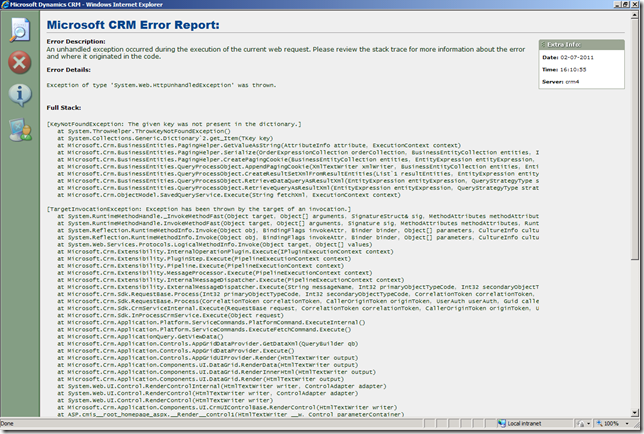
Today I ran into a strange error when I was trying to open a CRM view. I got a screen shown as below (In case you are curious, I have CRM DevErrors option turned On in my web.config file in order to show CRM error in the following fashion):
image

Basically CRM was complaining with the following message: 

Microsoft CRM Error Report: 
Error Description: 
An unhandled exception occurred during the execution of the current web request. Please review the stack trace for more information about the error and where it originated in the code.

Error Details: 
Exception of type 'System.Web.HttpUnhandledException' was thrown.

Full Stack: 
[KeyNotFoundException: The given key was not present in the dictionary.]
at System.ThrowHelper.ThrowKeyNotFoundException()
at System.Collections.Generic.Dictionary`2.get_Item(TKey key)
at Microsoft.Crm.BusinessEntities.PagingHelper.GetValueAsString(AttributeInfo attribute, ExecutionContext context)
at Microsoft.Crm.BusinessEntities.PagingHelper.Serialize(OrderExpressionCollection orderCollection, BusinessEntityCollection entities, Int32 pageNum, ExecutionContext context)
at Microsoft.Crm.BusinessEntities.PagingHelper.CreatePagingCookie(BusinessEntityCollection entities, EntityExpression entityExpression, ExecutionContext context)
at Microsoft.Crm.BusinessEntities.QueryProcessObject.AppendPagingCookie(XmlTextWriter xmlWriter, BusinessEntityCollection entities, EntityExpression entityExpression, ExecutionContext context)
at Microsoft.Crm.BusinessEntities.QueryProcessObject.CreateResultSetXmlFromResultEntities(List`1 resultEntities, EntityExpression entityExpression, Boolean moreRecords, ExecutionContext context)
at Microsoft.Crm.BusinessEntities.QueryProcessObject.RetrieveDataQueryAsResultXml(EntityExpression entityExpression, QueryStrategyType strategyType, ExecutionContext context)
at Microsoft.Crm.BusinessEntities.QueryProcessObject.RetrieveQueryAsResultXml(EntityExpression entityExpression, QueryStrategyType strategyType, ExecutionContext context)
at Microsoft.Crm.ObjectModel.SavedQueryService.Execute(String fetchXml, ExecutionContext context)

[TargetInvocationException: Exception has been thrown by the target of an invocation.]
at System.RuntimeMethodHandle._InvokeMethodFast(Object target, Object[] arguments, SignatureStruct& sig, MethodAttributes methodAttributes, RuntimeTypeHandle typeOwner)
at System.RuntimeMethodHandle.InvokeMethodFast(Object target, Object[] arguments, Signature sig, MethodAttributes methodAttributes, RuntimeTypeHandle typeOwner)
at System.Reflection.RuntimeMethodInfo.Invoke(Object obj, BindingFlags invokeAttr, Binder binder, Object[] parameters, CultureInfo culture, Boolean skipVisibilityChecks)
at System.Reflection.RuntimeMethodInfo.Invoke(Object obj, BindingFlags invokeAttr, Binder binder, Object[] parameters, CultureInfo culture)
at System.Web.Services.Protocols.LogicalMethodInfo.Invoke(Object target, Object[] values)
at Microsoft.Crm.Extensibility.InternalOperationPlugin.Execute(IPluginExecutionContext context)
at Microsoft.Crm.Extensibility.PluginStep.Execute(PipelineExecutionContext context)
at Microsoft.Crm.Extensibility.Pipeline.Execute(PipelineExecutionContext context)
at Microsoft.Crm.Extensibility.MessageProcessor.Execute(PipelineExecutionContext context)
at Microsoft.Crm.Extensibility.InternalMessageDispatcher.Execute(PipelineExecutionContext context)
at Microsoft.Crm.Extensibility.ExternalMessageDispatcher.Execute(String messageName, Int32 primaryObjectTypeCode, Int32 secondaryObjectTypeCode, PropertyBag fields, CorrelationToken correlationToken, CallerOriginToken originToken, UserAuth userAuth, Guid callerId)
at Microsoft.Crm.Sdk.RequestBase.Process(Int32 primaryObjectTypeCode, Int32 secondaryObjectTypeCode, CorrelationToken correlationToken, CallerOriginToken originToken, UserAuth userAuth, Guid callerId)
at Microsoft.Crm.Sdk.RequestBase.Process(CorrelationToken correlationToken, CallerOriginToken originToken, UserAuth userAuth, Guid callerId)
at Microsoft.Crm.Sdk.CrmServiceInternal.Execute(RequestBase request, CorrelationToken correlationToken, CallerOriginToken originToken, UserAuth userAuth, Guid callerId)
at Microsoft.Crm.Sdk.InProcessCrmService.Execute(Object request)
at Microsoft.Crm.Application.Platform.ServiceCommands.PlatformCommand.ExecuteInternal()
at Microsoft.Crm.Application.Platform.ServiceCommands.ExecuteFetchCommand.Execute()
at Microsoft.Crm.ApplicationQuery.GetViewData()
at Microsoft.Crm.Application.Controls.AppGridDataProvider.GetDataXml(QueryBuilder qb)
at Microsoft.Crm.Application.Controls.AppGridDataProvider.Execute()
at Microsoft.Crm.Application.Controls.AppGridUIProvider.Render(HtmlTextWriter output)
at Microsoft.Crm.Application.Components.UI.DataGrid.RenderData(HtmlTextWriter output)
at Microsoft.Crm.Application.Components.UI.DataGrid.RenderInnerHtml(HtmlTextWriter output)
at Microsoft.Crm.Application.Components.UI.DataGrid.Render(HtmlTextWriter output)
at System.Web.UI.Control.RenderControlInternal(HtmlTextWriter writer, ControlAdapter adapter)
at System.Web.UI.Control.RenderControl(HtmlTextWriter writer, ControlAdapter adapter)
at System.Web.UI.Control.RenderControl(HtmlTextWriter writer)
at Microsoft.Crm.Application.Components.UI.CrmUIControlBase.RenderControl(HtmlTextWriter writer)
at ASP.cmis__root_homepage_aspx.__Render__control1(HtmlTextWriter __w, Control parameterContainer)
at System.Web.UI.Control.RenderChildrenInternal(HtmlTextWriter writer, ICollection children)
at System.Web.UI.Control.RenderChildren(HtmlTextWriter writer)
at System.Web.UI.Page.Render(HtmlTextWriter writer)
at System.Web.UI.Control.RenderControlInternal(HtmlTextWriter writer, ControlAdapter adapter)
at System.Web.UI.Control.RenderControl(HtmlTextWriter writer, ControlAdapter adapter)
at System.Web.UI.Control.RenderControl(HtmlTextWriter writer)
at System.Web.UI.Page.ProcessRequestMain(Boolean includeStagesBeforeAsyncPoint, Boolean includeStagesAfterAsyncPoint)

[HttpUnhandledException: Exception of type 'System.Web.HttpUnhandledException' was thrown.]
at System.Web.UI.Page.HandleError(Exception e)
at System.Web.UI.Page.ProcessRequestMain(Boolean includeStagesBeforeAsyncPoint, Boolean includeStagesAfterAsyncPoint)
at System.Web.UI.Page.ProcessRequest(Boolean includeStagesBeforeAsyncPoint, Boolean includeStagesAfterAsyncPoint)
at System.Web.UI.Page.ProcessRequest()
at System.Web.UI.Page.ProcessRequestWithNoAssert(HttpContext context)
at System.Web.UI.Page.ProcessRequest(HttpContext context)
at ASP.cmis__root_homepage_aspx.ProcessRequest(HttpContext context)
at System.Web.HttpApplication.CallHandlerExecutionStep.System.Web.HttpApplication.IExecutionStep.Execute()
at System.Web.HttpApplication.ExecuteStep(IExecutionStep step, Boolean& completedSynchronously)

The problem was almost impossible to identify. Even I tried to turn on trace log, I cannot see any helpful message. But fortunately I quickly realized that our business analyst folks have recently deleted an option from a picklist field of this entity. However, there are some data in the system that are still referencing that option. As soon as I realized the cause, it wasn't too hard to fix this issue. What I did was, add back the option that we previously deleted using the same integer option value, publish the entity customization change, and then delete all data referencing that picklist option, and then I can safely delete the same picklist option.

There could be a hundred of different scenarios that could lead to "The given key was not present in the dictionary", the key to determine whether the solution applies to you, is to check that you have "Microsoft.Crm.BusinessEntities.PagingHelper.GetValueAsString(AttributeInfo attribute, ExecutionContext context)" message in the error log, and the error happens when you click to open a CRM view.

I was hoping that CRM platform could have handled this more gracefully, but not a big deal if you know the solution.

Hope this helps if you ever come across the same issue.

Cheers!