Friday, July 01, 2011

Hey, I am a Microsoft MVP now

I found that it was a very pleasant experience during the last couple of years while I was working with Microsoft Dynamics CRM and related .NET technology. Today there came a new surprise and a privilege that I received an email this morning from Microsoft team which informed me that I have been awarded as a Microsoft Dynamics CRM MVP.
MVP550x222

I would like to say thanks to the CRM community, it's a very generous community that people really liked to share their working knowledge of Microsoft Dynamics CRM product. Particularly I want to thank the fellow CRM MVPs, Andriy Butenko, Dave Berry, David Jennaway, and also Jim Glass (who is a Microsoft fellow and a CRM community lead), for the tremendous support that I have received from them on CRM Development Forum. I also hope to extend my appreciation to Microsoft Community & Online Support team, and the MVP leads from Microsoft Canada, for their recognition of my contribution in the CRM community, even though I consider my contribution significantly trivial.

I want to thank Microsoft Dynamics CRM team for their hard work to keep evolving the product into a better and better development platform in the past few years. CRM platform has got great potentials in the future, keep up all the good work, folks!

From the community perspective, I have recently noticed some very talented resources in the forums after CRM 2011 has been released, I would like to thank those of you for your hard work and the contributions that you have made to the community. You can be assured that your contributions will be recognized as well one day, we need more MVPs to help grow the community!

Cheers,
Daniel

Tuesday, June 28, 2011

Step-by-step Walkthrough: Use CRM 2011 Organization (SOAP) Service from a Console Application

[DISCLAIMER] This blog post should be used for reference only, I wouldn't recommend using this approach in your production code, since many default options generated by WCF service reference don't actually work for CRM2011, and also it would require significant effort to make it work for CRM Online and IFD deployments. In addition to this blog post, you should check out Girish Raja's TechEd session[END OF DISCLAIMER]

This blog post describes how to consume CRM 2011 Organization (SOAP) services from a console application, which can also be used for your Windows Service, Windows Form application, and probably even another WCF service that you may want to develop in order to delegate the service calls to CRM Server. This can be considered as a supplementary guideline of CRM SDK document, which is currently missing as of the latest SDK v5.0.4.

This blog post is primarily inspired by and based on CRM document - Walkthrough: Use the SOAP Endpoint for Web Resources with Silverlight.

Let's get started.

Create the Silverlight Project in Visual Studio 2010

In Visual Studio 2010 create a Console application. This walkthrough will use the name SoapFromConsoleApp, but you can use whatever name you wish. You will need to make changes as necessary because the name of the project is also the default namespace for the application.

Add a Service Reference to the Organization Service.

In the SoapFromConsoleApp project, right-click References and select Add Service Reference from the context menu.
  1. In the Add Service Reference dialog box type the URL to the Organization service and click Go.
    The URL to the service is located on the Developer Resources page of Microsoft Dynamics CRM 2011. In the Settings area select Customizations and then select Developer Resources.
    The URL has the format <organization URL>/XRMServices/2011/Organization.svc
  2. Enter a namespace in the Namespace field and then click OK.
    This walkthrough will use the namespace CrmSdk.
Add Supporting Classes and Edit files
  1. In the SoapFromConsoleApp project, add a new file with a class called XrmExtensionMethods.cs with the following code. The namespace for this class must match the namespace of your project.


    using System;
    using System.Collections.Generic;
    using System.Runtime.Serialization;
    
    namespace SoapFromConsoleApp.CrmSdk
    {
        partial class Entity
        {
            public Entity()
            {
                this.FormattedValuesField = new FormattedValueCollection();
                this.RelatedEntitiesField = new RelatedEntityCollection();
            }
    
            public T GetAttributeValue<T>(string attributeLogicalName)
            {
                if (null == this.Attributes) { this.Attributes = new AttributeCollection(); };
    
                object value;
                if (this.Attributes.TryGetValue(attributeLogicalName, out value))
                {
                    return (T)value;
                }
    
                return default(T);
            }
    
            public object this[string attributeName]
            {
                get
                {
                    if (null == this.Attributes) { this.Attributes = new AttributeCollection(); };
                    return this.Attributes.GetItem(attributeName);
                }
    
                set
                {
                    if (null == this.Attributes) { this.Attributes = new AttributeCollection(); };
                    this.Attributes.SetItem(attributeName, value);
                }
            }
        }
    
        [KnownType(typeof(AppointmentRequest))]
        [KnownType(typeof(AttributeMetadata))]
        [KnownType(typeof(ColumnSet))]
        [KnownType(typeof(DateTime))]
        [KnownType(typeof(Entity))]
        [KnownType(typeof(EntityCollection))]
        [KnownType(typeof(EntityFilters))]
        [KnownType(typeof(EntityMetadata))]
        [KnownType(typeof(EntityReference))]
        [KnownType(typeof(EntityReferenceCollection))]
        [KnownType(typeof(Label))]
        [KnownType(typeof(LookupAttributeMetadata))]
        [KnownType(typeof(ManyToManyRelationshipMetadata))]
        [KnownType(typeof(OneToManyRelationshipMetadata))]
        [KnownType(typeof(OptionSetMetadataBase))]
        [KnownType(typeof(OptionSetValue))]
        [KnownType(typeof(PagingInfo))]
        [KnownType(typeof(ParameterCollection))]
        [KnownType(typeof(PrincipalAccess))]
        [KnownType(typeof(PropagationOwnershipOptions))]
        [KnownType(typeof(QueryBase))]
        [KnownType(typeof(Relationship))]
        [KnownType(typeof(RelationshipMetadataBase))]
        [KnownType(typeof(RelationshipQueryCollection))]
        [KnownType(typeof(RibbonLocationFilters))]
        [KnownType(typeof(RollupType))]
        [KnownType(typeof(StringAttributeMetadata))]
        [KnownType(typeof(TargetFieldType))]
        partial class OrganizationRequest
        {
            public object this[string key]
            {
                get
                {
                    if (null == this.Parameters) { this.Parameters = new ParameterCollection(); };
    
                    return this.Parameters.GetItem(key);
                }
    
                set
                {
                    if (null == this.Parameters) { this.Parameters = new ParameterCollection(); };
    
                    this.Parameters.SetItem(key, value);
                }
            }
        }
    
        [KnownType(typeof(AccessRights))]
        [KnownType(typeof(AttributeMetadata))]
        [KnownType(typeof(AttributePrivilegeCollection))]
        [KnownType(typeof(AuditDetail))]
        [KnownType(typeof(AuditDetailCollection))]
        [KnownType(typeof(AuditPartitionDetailCollection))]
        [KnownType(typeof(DateTime))]
        [KnownType(typeof(Entity))]
        [KnownType(typeof(EntityCollection))]
        [KnownType(typeof(EntityMetadata))]
        [KnownType(typeof(EntityReferenceCollection))]
        [KnownType(typeof(Guid))]
        [KnownType(typeof(Label))]
        [KnownType(typeof(ManagedPropertyMetadata))]
        [KnownType(typeof(OptionSetMetadataBase))]
        [KnownType(typeof(OrganizationResources))]
        [KnownType(typeof(ParameterCollection))]
        [KnownType(typeof(QueryExpression))]
        [KnownType(typeof(RelationshipMetadataBase))]
        [KnownType(typeof(SearchResults))]
        [KnownType(typeof(ValidationResult))]
        partial class OrganizationResponse
        {
            public object this[string key]
            {
                get
                {
                    if (null == this.Results) { this.Results = new ParameterCollection(); };
    
                    return this.Results.GetItem(key);
                }
            }
        }
    
        public static class CollectionExtensions
        {
            public static TValue GetItem<TKey, TValue>(this IList<KeyValuePair<TKey, TValue>> collection, TKey key)
            {
                TValue value;
                if (TryGetValue(collection, key, out value))
                {
                    return value;
                }
    
                throw new KeyNotFoundException("Key = " + key);
            }
    
            public static void SetItem<TKey, TValue>(this IList<KeyValuePair<TKey, TValue>> collection, TKey key, TValue value)
            {
                int index;
                if (TryGetIndex<TKey, TValue>(collection, key, out index))
                {
                    collection.RemoveAt(index);
                }
    
                //If the value is an array, it needs to be converted into a List. This is due to how Silverlight serializes
                //Arrays and IList<T> objects (they are both serialized with the same namespace). Any collection objects will
                //already add the KnownType for IList<T>, which means that any parameters that are arrays cannot be added
                //as a KnownType (or it will throw an exception).
                Array array = value as Array;
                if (null != array)
                {
                    Type listType = typeof(List<>).GetGenericTypeDefinition().MakeGenericType(array.GetType().GetElementType());
                    object list = Activator.CreateInstance(listType, array);
                    try
                    {
                        value = (TValue)list;
                    }
                    catch (InvalidCastException)
                    {
                        //Don't do the conversion because the types are not compatible
                    }
                }
    
                collection.Add(new KeyValuePair<TKey, TValue>() { Key = key, Value = value });
            }
    
            public static bool ContainsKey<TKey, TValue>(this IList<KeyValuePair<TKey, TValue>> collection, TKey key)
            {
                int index;
                return TryGetIndex<TKey, TValue>(collection, key, out index);
            }
    
            public static bool TryGetValue<TKey, TValue>(this IList<KeyValuePair<TKey, TValue>> collection, TKey key, out TValue value)
            {
                int index;
                if (TryGetIndex<TKey, TValue>(collection, key, out index))
                {
                    value = collection[index].Value;
                    return true;
                }
    
                value = default(TValue);
                return false;
            }
    
            private static bool TryGetIndex<TKey, TValue>(IList<KeyValuePair<TKey, TValue>> collection, TKey key, out int index)
            {
                if (null == collection || null == key)
                {
                    index = -1;
                    return false;
                }
    
                index = -1;
                for (int i = 0; i < collection.Count; i++)
                {
                    if (key.Equals(collection[i].Key))
                    {
                        index = i;
                        return true;
                    }
                }
    
                return false;
            }
        }
    
        [KnownType(typeof(QueryBase))]
        [KnownType(typeof(Relationship))]
        [KnownType(typeof(EntityCollection))]
        [DataContract(Namespace = "http://schemas.datacontract.org/2004/07/System.Collections.Generic")]
        public sealed class KeyValuePair<TKey, TValue>
        {
            #region Properties
            [DataMember(Name = "key")]
            public TKey Key { get; set; }
    
            [DataMember(Name = "value")]
            public TValue Value { get; set; }
            #endregion
        }
    
        #region Collection Instantiation
        partial class EntityCollection
        {
            public EntityCollection()
            {
                this.EntitiesField = new Entity[]{};
            }
        }
    
        partial class Label
        {
            public Label()
            {
                this.LocalizedLabelsField = new LocalizedLabelCollection();
            }
        }
    
        #endregion
    }
    
    
  2. Edit the SoapFromConsoleApp\Service References\CrmSdk\Reference.svcmap\Reference.cs file. Change each instance of "System.Collections.Generic.KeyValuePair<" to "KeyValuePair<". This will change the reference from System.Collections.Generic.KeyValuePair to the class defined in the XrmExtensionMethods.cs file.

    You should find 22 instances.

    If you do not see the Reference.cs file, in the Solution Explorer, click the Show All Files button.
Consume the Organization Services
  1. Double click Program.cs to open the file.
  2. Paste the following code to the file.
    using System;
    using SoapFromConsoleApp.CrmSdk;
    
    namespace SoapFromConsoleApp
    {
        class Program
        {
            static int MaxRecordsToReturn = 1;
    
            static void Main(string[] args)
            {
                using (var xrmServiceClient = InstantiateXrmService())
                {
                    var accountId = CreateCrmAccount(xrmServiceClient);
    
                    var account = QueryCrmAccount(xrmServiceClient, accountId);
    
                    UpdateCrmAccount(xrmServiceClient, account);
    
                    DeleteCrmAccount(xrmServiceClient, accountId);
                }
            }
    
            private static Guid CreateCrmAccount(OrganizationServiceClient xrmServiceClient)
            {
                var account = new Entity
                {
                    LogicalName = "account"
                };
    
                account["name"] = "ABC Inc.";
                account["telephone1"] = "111-222-3333";
    
                return xrmServiceClient.Create(account);
            }
    
            private static Entity QueryCrmAccount(OrganizationServiceClient xrmServiceClient, Guid accountId)
            {
                var query = new QueryExpression
                                {
                                    EntityName = "account",
                                    ColumnSet = new ColumnSet { Columns = new string[] {"name"}},
                                    Orders = new []
                                                 {
                                                     new OrderExpression() {AttributeName = "name", OrderType = OrderType.Ascending}
                                                 },
                                    Criteria = new FilterExpression()
                                                   {
                                                       Conditions = new []
                                                                        {
                                                                            new ConditionExpression
                                                                                {
                                                                                    AttributeName = "accountid",
                                                                                    Operator = ConditionOperator.Equal,
                                                                                    Values = new object[] {accountId}
                                                                                }
                                                                        }
                                                   },
                                    PageInfo = new PagingInfo {Count = MaxRecordsToReturn, PageNumber = 1, PagingCookie = null},
                                };
    
                var request = new OrganizationRequest() { RequestName = "RetrieveMultiple" };
                request["Query"] = query;
    
                OrganizationResponse response = xrmServiceClient.Execute(request);
                var results = (EntityCollection)response["EntityCollection"];
    
                return results.Entities[0];
            }
    
            private static void UpdateCrmAccount(OrganizationServiceClient xrmServiceClient, Entity account)
            {
                account["name"] = "ABC Ltd.";
                xrmServiceClient.Update(account);
            }
    
            private static void DeleteCrmAccount(OrganizationServiceClient xrmServiceClient, Guid accountId)
            {
                xrmServiceClient.Delete("account", accountId);
            }
    
            private static OrganizationServiceClient InstantiateXrmService()
            {
                var xrmServiceClient = new OrganizationServiceClient();
    
                // Uncomment the following line if you want to use an explicit CRM account to make the service calls
                // xrmServiceClient.ClientCredentials.Windows.ClientCredential = new NetworkCredential("administrator", "admin", "Contoso");
    
                return xrmServiceClient;
            }
        }
    }
  3. Compile and run the application.
In the above console application, I have shown you how to CRM account record, query it, then update it by change its name, and delete it at last.

Note that this is an old-fashioned way to make service calls to CRM server (which might be the reason that this is not in CRM SDK document), but I believe there are scenarios that you might need this approach.
Finally, if you run into any problem using the code, please let me know. I realized that I might need to look into the SetItem method a little further to make sure the serialization is done properly, since the code was taken from CRM SDK Silverlight project. If you have already spotted any problem, please kindly let me know.

I have also provided a download link of the entire project that I compiled (on SkyDrive).

Hope this helps.

Saturday, April 09, 2011

Microsoft Dynamics CRM 2011 JavaScript Development Cheat Sheet

Microsoft Dynamics CRM 2011 has dramatically changed the JavaScript programming experience when compared to CRM4. So I thought a cheat sheet (or a quick reference document) would help myself get familiar with the latest programming interface. You may download it from the following link on my Windows Live SkyDrive. (Also available at Google Site).


On a side note, some of you may have been curious about (or possibly somehow frustrated by) such API level changes made by MSCRM team in CRM v2011. I think the changes are made for good reasons.
  1. The first motivation is really about the industry standard of JavaScript development. In CRM 4, we use crmForm.all.xxx syntax everywhere, which is really convenient. But it is actually against the best practice in JavaScript development, as this technique is not supported by any other browsers. You may think that CRM2011 is only supported by IE at this moment anyway, why would I care about any other browsers. You are right, CRM2011 is not a cross-browser application, but it doesn't mean that is going to be the case forever. I am relatively confident that the next MSCRM will be a cross-browser one. In fact, I had a close look of some CRM 2011 JavaScript code the other day, I was under the impression that CRM team (probably part of the team) might have tried to make MSCRM 2011 a cross-browser one, but they didn't make the cut for some reasons.
  2. The new CRM 2011 library provides a lot more richer API than CRM4. So we shall require less hacking code if we can take full advantage of the new library, which makes our code more compatible with the future versions.
Note that this cheat sheet primarily focused on the development of CRM form scripts. It didn't cover all aspects of CRM client development practice. If you need a more comprehensive reference of CRM 2011 development practice, SDK document (Download Link) is the best resource available.

As a final note, you should quit using crmForm.all.xxx syntax in CRM 2011 if you are still doing so. ;-)

I hope the cheat sheet useful, and it worths a small spot on your cubicle wall(s). ;-)

[Update - Jun 6, 2011] I uploaded a new version with many fixes of the problems caused by copy/paste. I didn't realize the problems until last week, mainly because I don't work with CRM on day-to-day basis. Sorry for the inconvenience.

Add Spell Checker to Microsoft Dynamics CRM Application

In CRM projects, I often hear the complaints about the lack of spell checking feature in CRM application. Most business users tend to believe it's the application's fault for not having such important feature. In fact, spell checking should be something offered by browser. If you have ever tried any other browsers in the market, you may have noticed that most browsers (Chrome, Opera, Firefox, Safari) nowadays are offering spell checking feature out-of-the-box. IE has been pretty much the only exception among those modern browsers in this perspective.

I was previously aware of an IE addon called ieSpell which offers spell checking solution in IE. But it is far from being an ideal solution because it doesn't instantly highlight any wrong spellings, which in my opinion makes it almost useless.

I happened to come across another free IE addon called Speckie this week which I believe provides a much better spell checking solution in IE. So I thought I should share with everyone here.

After you have installed Speckie, you may notice that Speckie doesn't perform spell check for single line textbox field by default. If you want to enable this option, you can go to IE Tools menu, and click "Speckie Options".

Speckie Options

Then you can check "Enable spell check in single line edit fields" option, and click "Apply" button.

Configure Speckie

After you have done so, you should restart your browser in order for the option to take effect.

The following are a few screenshots in action.

  • Speckie spell checking for MSCRM4 textbox field

Spell Check for CRM4 Textbox Field

  • Speckie spell checking for MSCRM4 notes field

Spell Check for CRM4 Notes Field

  • Speckie spell checking for MSCRM4 textbox field

Spell Check for CRM2011 Textbox Field

I have only been using this addon for a couple of days, I cannot endorse the quality and reliability of this addon. But I am so far very happy with it.

Hope this helps.

Thursday, April 07, 2011

Reached 50,000 Page Views!

I happened to have noticed today that my blog has just reached 50,000 page views this week, based on the data from Google Analytics. You may have noticed that I have a Blogger pageview widget which is only counting to about 43,500 views as of today. The reason for the difference is, PageView stats function was not available on Blogger platform in the very beginning. Believe me, I didn't lie to you, the following is the Google Analytics stats information that I took the screenshot about 90 minutes ago. 50000PageViews
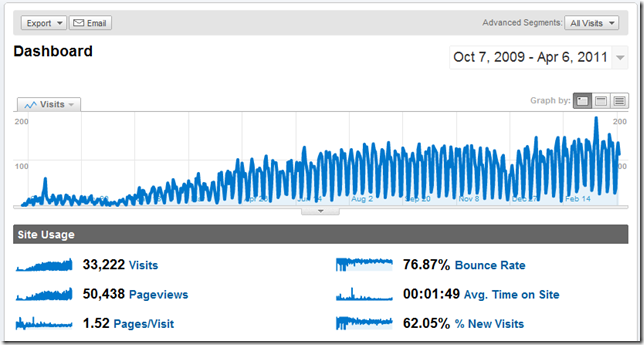
Please don't think that I'm trying to show off here. With only 50,000 Page Views in total in one and half years, there is nothing to show off about. IMHO, I am nowhere close to the page views of any Lady Gaga fan blogs, and I don't think that I would ever be able to make this blog as popular as they are any time soon.

About two years ago (Apr 29, 2009 to be exact), I felt a little bored so I started the journey of writing a technical blog. Did I just sound very politic? YES, I suppose that I was a bit. In fact, one of the important reason is, I don't usually keep track of every details in a very organized way, sometimes I can lose track of what I just did a few days ago or probably a few months ago. In China, we have a say, "The palest ink is better than the best memory". So writing a technical blog not only helps challenges myself, but also has helped me keep track of such details. However, there is another important motivation, which should be kept just between you and me, I have been sick of walking into an interview room with a piece of resume in my hand, which doesn't prove anything nowadays. So I thought writing a technical blog would prove that I am capable of doing some little things, that was just the selfish part of myself. However, I didn't realize in the beginning that writing a blog was actually quite a challenge. As you may not appreciate, it did take me quite a lot of personal spare time to keep this blog updated, even though I am well aware that I haven't actually written much so far. I have to admit, my writing was terribly slow and my English was often broken (thanks for bearing with me all the time), and often times I had to revise my blog posts again and again just trying to make them readable. On a side note, I have quite a lot other topics in my mind that I just haven't got the time to write them down, including some pretty cool (only in my own opinion though) ideas that I wanted to implement on MSCRM platform.

My blog has been mostly focused on MSCRM development practice to this date. I might be switching to some other topics in the future, as MSCRM is no longer something that I am working on daily basis. But I will try to write some CRM posts when I can find time.

Thanks to the CRM community for your support all the time, and more importantly your patience while listening to my mumblings.

Sunday, April 03, 2011

MSCRM 4.0 Error: "Record is Unavailable" after CRM Organization Import

I recently ran into an interesting CRM error after I imported a CRM organization. I got the following error when I was trying to navigate to CRM homepage, after the CRM organization was successfully imported.
Record is Unavailable
The requested record was not found or you do not have sufficient permissions to view it. 
CMIS Import Organization Error

The solution was actually quite simple, you just have to reboot your server after you have imported a CRM organization. I got stumbled upon this error at least twice recently, so I thought I should blog it in case that in the case that you happen to run into this error too.

I believe the error happens when you try to refresh your CRM environment using the same CRM organization name in Deployment Manager before and after the import. My situation is, I had a CRM organization name called ABC previously. But I need to refresh this particular environment (UAT) by using a full db backup from another environment (Production). So I have to create a temporary CRM organization in my UAT server's Deployment Manager, and then I can import the production db backup in order to use the same CRM organization name (ABC). My sense is the CRM organization name was not changed during the ABC –> Temp –> ABC import process, CRM Web application was on the assumption that nothing has changed, so it didn't try to refresh all cached CRM application data including CRM organization information, metadata, etc., which pitifully caused this error.

I believe you could also resolve this problem by restarting all CRM related services on the CRM server, including IIS, CRM Asynchronous Service, and possibly Email Router, etc. But rebooting is always the easiest solution to try first when we have problems with our computers, isn't it?

Hope this helps.