Wednesday, April 21, 2010

MSCRM 4.0: Hide Duplicate Titles of CRM Notes Field

There was a question on CRM Development Forum about how to hide one of the titles of CRM notes field. The requirement is to make it looks like something as below.

Before hiding:

HideNotesTitle1

After hiding the titles:

HideNotesTitle

Here is the script that I came up.

(function hideNotesTitle() {
    var notesField = crmForm.all.notescontrol;
    if (!notesField) return;  // there is no notes field on current form

    var onReadyStateChange = function() {
        if (notesField.readyState === 'complete') {
            var notesDoc = notesField.contentWindow.document;
            var notesTable = notesDoc.getElementById("NotesTable");
            var notesTableBody = notesTable.childNodes[1];

            for (var i = 0, len = notesTableBody.childNodes.length; i < len; i++) {
                var row = notesTableBody.childNodes[i];
                if (row.className == "noteHeader" && !row.oId) {
                    row.style.display = "none";
                }
            }

            notesField.detachEvent('onreadystatechange', onReadyStateChange);
        }
    };

    notesField.attachEvent('onreadystatechange', onReadyStateChange);
})();

To use the function, you simply copy the code to your CRM form's OnLoad event.

Hope this snippet gives you some idea about how to work with CRM notes field if you ever need to do something similar.

Cheers!

Sunday, April 18, 2010

MSCRM 4.0: Get CRM Report's ID by its Name

There has been a question on CRM Development Forum about how to get a CRM report's ID by its name. Here is the script that I came up using CRM Web Service Toolkit.
/**
* Get a CRM report's ID by its name.
* @author Daniel Cai, http://danielcai.blogspot.com/
*
* Parameters:
* @param reportName: The CRM Report's name. 
*/
getReportId = function(reportName)
{
    var fetchXml = [
        "<fetch mapping='logical'>",
           "<entity name='report'>",
           "<attribute name='reportid' />",
           "<filter>",
              "<condition attribute='name' operator='eq' value='", reportName, "' />",
           "</filter>",
           "</entity>",
        "</fetch>"
    ].join("");

    var result = CrmServiceToolkit.Fetch(fetchXml);
    if (result === null) {
        throw new Error("Report " + reportName + " cannot be found. "); // This should never happen if the report exists, but you should handle the exception just in case.
    }

    return result[0].getValue("reportid");
};
To use the function, you simply call it with the report's name as the only parameter, e.g.
var reportId = getReportId("Quote"); // Get "Quote" report's GUID
You will have to make CRM Web Service Toolkit available on the form. You can either copy the toolkit's JS code to your form's OnLoad event, or use my another piece of script to load the toolkit from external file.

You may wonder why you ever need this function. The reason is, when you have a custom report built for a CRM entity, and you want to add a custom button on the entity form to launch the report instantly, in which case you will need to call CRM's RunReport() function, which takes report's GUID as the last parameter (sHelpId). When a custom report is downloaded/uploaded from one environment to another one, the report's ID would be different. If you won't want to hard-code your report's ID when you make call to CRM RunReport() function, it is when this function comes to rescue you.

Cheers.

Tuesday, April 06, 2010

MSCRM 4.0: Disable All Fields on a CRM Form Tab

There has been a question on CRM Development Forum about how to make all CRM fields read only on a CRM form tab. Here is the script that I just came up.
/**
 * Disable all CRM fields on a CRM form's tab.
 * @author Daniel Cai, http://danielcai.blogspot.com/
 *
 * Parameters:
 * @param tabIndex: The index number of the tab that you want to disable the 
 *                  CRM fields. It's a zero-based number. 
 */
function disableTab(tabIndex) {
    var tab = document.all["tab" + tabIndex];

    for (var i = 0; i < tab.all.length; i++) {
        if (tab.all[i].Disabled !== undefined) {
            tab.all[i].Disabled = true;
        }
    }
}

To use the function, you simply call it with the tab's index number as the single parameter, e.g.
disableTab(2); // Disable all CRM fields on the third tab
Have fun.

Sunday, April 04, 2010

MSCRM 4.0: Watermark CRM DateTime Field

There are a lot of people in the world who prefer keyboard to mouse clicks when it comes to data input. Microsoft Dynamics CRM users usually like and appreciate the user controls that come with the CRM platform, such as the picklist, date picker, lookup, and etc. You may take all the credit as the magic developer for all the cool stuff that MSCRM team has delivered for us. But sooner or later, you may be asked by your CRM users, "Can we do this, can we do that? ", which is often something that MSCRM doesn't work the exact way out-of-box.

One of the features that your CRM users could possible request is, CRM datepicker is a nice control, it works very well, but sometime we as CRM users want to type in the date directly in the textbox instead of using mouse click to pick a date, which is way too slow to get the job done. But the problem is the CRM users often don't know in which format they are supposed to type in the date. You are asked if you can provide a visual hint to the user about the date format. Then as a professional CRM developer, you will quickly realize that, what your CRM users actually want is a watermark for the datepicker field in the CRM form, probably something like the following picture.
DateTime Watermark

You show the idea to your customer, in most cases they will like the idea, and think you are a genius that can read their mind. Then you come to the implementation, which I have done for you.
/**
 * Setup watermark for CRM Date fields based on user's date time format settings.
 * @author Daniel Cai, http://danielcai.blogspot.com/
 *
 * Parameters:
 * @param dateField: The datetime field that you want to apploy the watermark. 
 *                   If not provided, all Date fields in the form will be masked.
 */
watermarkDateField = function(dateField) {
    var defaultColor = "#000000";
    var watermarkColor = "#9c9c9c";
    var watermarkText = USER_DATE_FORMATTED_FORMATSTRING;

    var clearWatermark = function(input) {
        // Clear the textbox only if the textbox contains the watermark text
        if (input.value === watermarkText) {
            input.value = "";
            input.style.color = defaultColor;
        }
    };

    var updateWatermark = function(input) {
        if (input.value === "") {
            input.value = watermarkText;
            input.style.color = watermarkColor;
        }
        else {
            input.style.color = defaultColor;
        }
    };

    var maskDateField = function(dateField)
    {
        var inputBox = dateField.childNodes[1].childNodes[0].childNodes[0].childNodes[0];
        if (!!inputBox) {
            inputBox.attachEvent("onfocus", function() { clearWatermark(inputBox); });
            inputBox.attachEvent("onblur", function() { updateWatermark(inputBox); });
            inputBox.attachEvent("onchange", function() { updateWatermark(inputBox); });
            crmForm.attachEvent("onsave", function() { clearWatermark(inputBox); });

            inputBox.title = watermarkText;
            updateWatermark(inputBox);
        }
    };

    (function init() {
        if (dateField !== undefined) {
            maskDateField(dateField);
        }
        else {
            var tables = document.getElementsByTagName("table");
            for (var i = 0; i < tables.length; i++) {
                if (tables[i].className === "ms-crm-DateTime") {
                    maskDateField(tables[i]);
                }
            }
        }
    })();
};

watermarkDateField();
What you would do is, copy the above code to the onLoad event of your CRM entity form which you want to watermark your date fields, publish the entity change, and open an existing entity record or create a new one, whew, all the empty date fields should have been watermarked!

A couple of notes about the code before we go.
  • The dateField parameter of the function is optional. When provided, it will only watermark the provided date field. If dateField is not provided, it will watermark all date fields in the CRM form.
  • Using the same technique, you can easily add watermark to any CRM textbox fields if there is ever such need. 
Hope this helps.

Saturday, March 27, 2010

MSCRM 4.0 - Remove 'Add Existing xxxxx to this record' button - Another Approach

Microsoft Dynamics CRM users are often confused by the "Add Existing xxxxx to the record" button in the associated views. It's very common in your CRM projects, that you, as a CRM pro, are asked by your CRM users to have this button removed from the interface.

For instance, you could possibly be asked to remove "Add Existing Contact" button from account's entity form's Contacts associated view, as shown below.
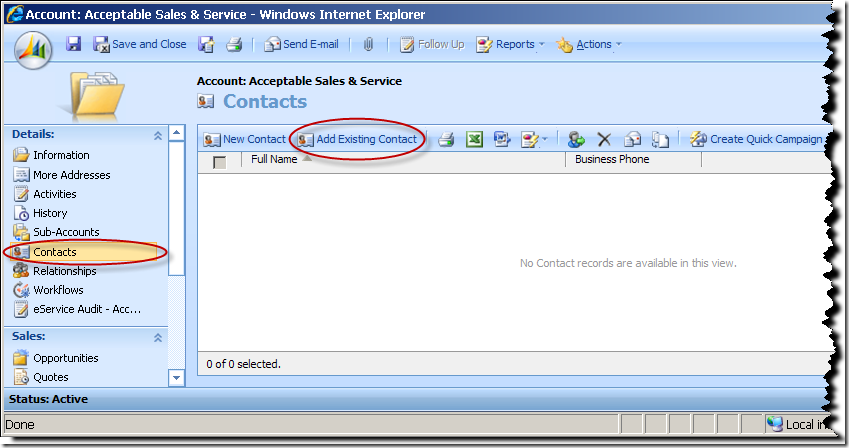
CRM Associated View

Solution for Standard CRM Associated View

In order to get this done with a standard CRM associated view, you may simply copy the following script to the onLoad event of account entity's form.
/**
 * Hide "Add Existing xxxxx button" in a CRM associated view.
 * @author Daniel Cai, http://danielcai.blogspot.com/
 *
 * Parameters:
 * @param navItemId: LHS navigator's HTML element ID of the associated view.
                     It usually starts with "nav".
 * @param relName:   The relationship name that the associated view represents.
 */
function hideAddExistingButton(navItemId, relName) {  
    var clickActionPattern =  /loadArea\(['"]{1}([A-Za-z0-9_]+)['"]{1}(, ?['"]\\x26roleOrd\\x3d(\d)['"])*\).*/; 
    var iframe
      , roleOrd;  
 
    var removeAddExistingButton = function() {  
        var frameDoc = iframe.contentWindow.document;  
        if (!frameDoc) return;  
 
        var grid = frameDoc.all['crmGrid'];  
        if (!grid) return;  
 
        var otc = grid.GetParameter('otc');

        // Locate the "Add Existing" button using its magic id.  
        var btnId = (!roleOrd)
                  ? '_MBtoplocAssocOneToMany' + otc + relName.replace(/_/g, "")
                  : '_MBtoplocAssocObj' + otc + relName.replace(/_/g, "") + roleOrd;
  
        var btn = frameDoc.getElementById(btnId);  
        if (btn) {  
            btn.parentNode.removeChild(btn);  
        }  
    };  
 
    var onReadyStateChange = function() {  
        if (iframe.readyState === 'complete') {  
            removeAddExistingButton();  
        }  
    };  
 
    (function init() {  
        if (!crmForm.ObjectId) return;  
 
        var navItem = document.getElementById(navItemId);  
        if (!navItem) return;  
 
        var clickAction = navItem.getAttributeNode('onclick').nodeValue;  
        if (!clickAction || !clickActionPattern.test(clickAction))  
            return;  
 
        var areaId = clickAction.replace(clickActionPattern, '$1');  
        roleOrd = clickAction.replace(clickActionPattern, '$3');
 
        navItem.onclick = function loadAreaOverride() {  
            if (!roleOrd)
                loadArea(areaId);
            else
                loadArea(areaId, '\x26roleOrd\x3d' + roleOrd);

 
            iframe = document.getElementById(areaId + 'Frame');  
            if (!iframe) return;  
 
            iframe.attachEvent('onreadystatechange', onReadyStateChange);  
        }  
    })();  
}  

hideAddExistingButton('navContacts', 'contact_customer_accounts');
As documented in the code's comment, you will need to provide two parameters to call the JavaScript function.
  1. navItemId, the navigator HTML element ID of the associated view. You can easily find the ID using IE's developer tools as shown below.
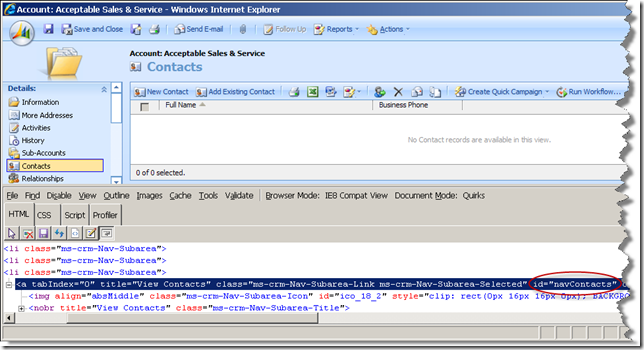
    CRM Associated View - NavItem
  2. relName, the relationship name that the associated view represents. In our previous example, you can find the relationship name as shown below.
    Account-Contact Relationship
As mentioned previously, the script should be copied to the onLoad event for the form of the primary entity in the 1:N (one-to-many) relationship that the associated view represents, when you are working with different entity.

Solution for Associated View Loaded in IFrame

After you have implemented the above code, your CRM users may come to you saying, "We like that the Add Existing button has been removed, thanks for that, but..., can we move the associated view to the form and we still want to have that button removed? " Does that just happen so often in our day-to-day programming life? I guess you wouldn't be the only developer in the world that deals with the constant software change every day. At the end of day, you would never want to let your customer down, so you will be looking for a new solution. Here I have it prepared for you.

As I have previously implemented a snippet of script to handle moving associated view to IFrame field on CRM form, I am going to add a few lines of code to the original code so it serves both purposes now.
/**
 * Load an associated view into an IFrame, hide it from LHS navigation menu,
 * and remove "Add Existing" button in the associated view. 
 * @author Daniel Cai, http://danielcai.blogspot.com/
 * 
 * Parameters:
 * @param iframe:      The IFrame's object, e.g. crmForm.all.IFrame_Employer_Address
 * @param navItemId:   LHS navigator's HTML element ID of the associated view.
                       It usually starts with "nav".
 * @param relName:     The relationship name, this parameter is only required
 *                     when you want to remove "Add Existing" button.
 */
function loadAssociatedViewInIFrame(iframe, navItemId, relName)
{
    var clickActionPattern =  /loadArea\(['"]{1}([A-Za-z0-9_]+)['"]{1}(, ?['"]\\x26roleOrd\\x3d(\d)['"])*\).*/;
    var roleOrd;

    var getFrameSrc = function (areaId)
    {
        var url = "areas.aspx?oId=" + encodeURI(crmForm.ObjectId);
        url += "&oType=" + crmForm.ObjectTypeCode;
        url += "&security=" + crmFormSubmit.crmFormSubmitSecurity.value;
        url += "&tabSet=" + areaId;
        url += (!roleOrd) ?  "" : "&roleOrd=" + roleOrd;

        return url;
    };

    var removeAddExistingButton = function(frameDoc) {
        if (!frameDoc || !relName) return;

        var grid = frameDoc.all['crmGrid'];
        if (!grid) return;

        var otc = grid.GetParameter('otc');
        
        // Locate the "Add Existing" button using its magic id.
        var btnId = (!roleOrd)
                  ? '_MBtoplocAssocOneToMany' + otc + relName.replace(/_/g, "")
                  : '_MBtoplocAssocObj' + otc + relName.replace(/_/g, "") + roleOrd;
        var btn = frameDoc.getElementById(btnId);
        if (btn) {
            btn.parentNode.removeChild(btn);
        }
    };

    var onReadyStateChange = function() {
        if (iframe.readyState === 'complete') {
            var frameDoc = iframe.contentWindow.document;
            removeAddExistingButton(frameDoc);

            // Remove the padding space around the iframe
            frameDoc.body.scroll = "no";
            frameDoc.body.childNodes[0].rows[0].cells[0].style.padding = "0px";
        }
    };

    (function init() {
        if (!crmForm.ObjectId) return;

        var navItem = document.getElementById(navItemId);
        if (!navItem) return;

        var clickAction = navItem.getAttributeNode('onclick').nodeValue;
        if (!clickAction || !clickActionPattern.test(clickAction))
            return;

        navItem.style.display = 'none';

        var areaId = clickAction.replace(clickActionPattern, '$1');
        roleOrd = clickAction.replace(clickActionPattern, '$3');

        iframe.src = getFrameSrc(areaId);
        iframe.allowTransparency = true; // Get rid of the white area around the IFrame
        iframe.attachEvent('onreadystatechange', onReadyStateChange);
    })();
};

loadAssociatedViewInIFrame(crmForm.all.IFRAME_Contacts, 'navContacts', 'contact_customer_accounts');
PS: I do know before writing this blog, Dave Hawes has previously provided a solution for this, which was often referred as the ultimate solution in the community. However, there are a few issues with the implementation, which I think are quite important:
  • It's not really compatible with multi-lingual CRM installation, as it tries to locate the "Add Existing" button by searching the button's title. In the case that you need to work with multi-lingual CRM implementation, your code may become really nasty.
  • The code that calls the function will need to be changed if you ever need to change the child entity's display name, as the button's title will change consequently in this case, after the entity's display name has been changed.
  • With Dave's code, the "Add Existing" button could re-appear if the user resizes the form.
  • The code only works for custom 1:N relationships, not the system ones, as the code assumes that the navigation item's ID is "nav_" + areaId, which is not true when it's a system built-in relationship, such as the one between account and contact, that we have used as our example. This is basically a bug of the code, not necessarily the disadvantage of the approach though.
This is why I am trying to take a different approach, hopefully this is a better approach.

Finally, a few important notes about the solution:
  • Be advised, this is not a solution that's supported by Microsoft, regardless of the improvement.
  • Using the same technique, it's pretty easy to remove any other buttons in CRM associated views. All you need to do is to find the button's element ID using IE developer tools as I have shown in one of the above screen shots, then you can remove the button from DOM using the code: btn.parentNode.removeChild(btn); Hope it's not something difficult for you.

[Update - Dec 29, 2010] After assisting Dina through email today to make the script work for one of her N:N relationship views, I updated the script so that it now supports both 1:N and N:N relationships.

Hope this helps.

Sunday, February 21, 2010

Another Talk about Referencing External JS Files in MSCRM Form

There have been numerous blog posts on Internet talking about loading external JavaScript files in MSCRM form for reuse purpose. I am trying to stir the water with some of my thoughts.

Why External JS Files?

There could be a number of reasons that you might want to use external JS files for MSCRM form development, as it provides a number of advantages when comparing to embedding JS code in the CRM form itself.

  • Using external JS files can make your script files reusable across CRM forms, possibly even across CRM projects. It's very common in every CRM project to have some shared code to be used on different forms, it's always not best practice to simply copy/paste the same code here and there, which will cause quite some maintenance headache in the future.
  • The text editor provided by CRM customization tool is not really a productive tool when being used on a day-to-day basis. The editor doesn't have intellisense, no auto-completion, not even syntax highlighting. Storing form script in external files, you can use any development tool of your own favorite to write code faster with less errors.
  • Using external JS files make it possible to version control your JS code using your own version control software. Although you can store your CRM customization files in your SCM repository, it is very difficult to track what changes have been made from version to version due to the size of customization file.
  • You might want to use third-party JavaScript libraries in your form script, such as jQuery (I usually try to avoid this but you may have your own reason for doing this), in which case you may find that it doesn't make much sense to copy a whole big chunk of such library code to every form that you might need to use.

How do you do it?

It's well-known in the CRM community that there are two approaches to help you reference external JS files.

  1. The first approach injects the JS files to the head tag of CRM form's HTML file, which is basically a DOM-based technique.
    // Load external JS file - CrmServiceToolkit.js. 
    // ******* Not my recommendation though *******
    var script2Load = document.createElement("script");
    script2Load.language = "javascript";
    script2Load.src = "/ISV/CrmServiceToolkit/CrmServiceToolkit.js";
    document.getElementsByTagName("HEAD")[0].appendChild(script2Load);
    script2Load.onreadystatechange = function () {
        if (event.srcElement.readyState == "loaded") {
            // Do stuff here
        }
    };
  2. The second approach uses IE browser's XMLHttpRequest object to download the script files, then uses window.eval() or window.execScript() function to execute the code in a synchronous fashion. This approach was inspired by Robert Amos's load_script code.
    // Function to load external script
    function loadExternalScript(url)
    {
        var x  = new ActiveXObject("Msxml2.XMLHTTP"); 
        x.open("GET", url, false); 
        x.send(null); 
        window.execScript(x.responseText); 
    }
    
    loadExternalScript("/ISV/MyApp/Scripts/Common.js");
    loadExternalScript("/ISV/MyApp/Scripts/FormScripts/Account.js");
    Note: Be advised, window.execScript is an IE proprietary function, which means that if MSCRM ever becomes a cross-browser application in the future, this technique will not work. Hopefully by then, MSCRM will officially support external custom script files. ;)

My preference is the second approach due to its simplicity and synchronous fashion.

Using the first approach, if you ever need to load more than one JS file (which is often the case), you will have to check each file's ready status before running any of your JS code. CRM MVP Adi Katz has devised a smart solution to help address this issue that allows you to load multiple JS files using one single JS function. However the code still seems too complicated for its own simple purpose.

You may have noticed that Odynia's orignial code has a few extra lines of code than mine, as he used eval() function, which involves a tricky eval scope issue. When eval() function is used, any variable or function defined in the external JS files in the following format, which you might be expecting them living in the global scope, are actually running in the eval local scope, so as soon as the eval() finishes, your functions or variables defined in external JS files are out of scope, which makes them useless. So Odynia used the extra lines of code to make them explicitly global citizens.

// If you define you variable or function this way in external JS files, 
// you will have to use Odynia's extra code to make them available in global scope. 
var myVal = 1;
function myFunc() {
    // Do something
}

Note: If a web browser other than IE is used, there is a way to use eval() function to evaluate such variables or functions to global scope, but simply not for IE, which is the only browser supported by MSCRM at this moment.

For this reason, there is a derived simplified version at Henry's blog (section of Addition 2) based on Odynia's code using eval() function. However, there is a catchy when using Henry’s code (InjectScript function of Addition 2), you will have to make any variables or functions defined in the external JS files as implicit global ones in the following format, otherwise you will run into the eval scope issue which I just mentioned above.

// Implicit global variables and functions
myVal = 1;
myFunc = function () {
    // Do something
}

Note: Be advised, implicit global variables are usually considered bad coding practice.

Another option is to explicitly define the scope of your variable and function in global window object, as shown below:

// Explicit global variables and functions
window.myVal = 1;
window.myFunc = function () {
    // Do something
}

Either of the above code will have certain impact on your code’s maintainability.

Best Practices of CRM Form Script Development

With the above code handy, I think I am ready to offer some suggestions about the best practices of CRM form script development.

  1. In order to reuse JavaScript code and have CRM form script being version controlled in SCM, it's recommended to use a common function to load all project shared JavaScript library and form-specific code in the form’s OnLoad event. The location of commonly shared JavaScript library shall be "/ISV/MyOrgName/Scripts/", or "/ISV/MyAppName/Scripts", and the form-specific script should go to its sub-folder called FormScripts. So an entity form’s OnLoad event code might look like this:
    // Function to load external script
    function loadExternalScript(url)
    {
        var x  = new ActiveXObject("Msxml2.XMLHTTP"); 
        x.open("GET", url, false); 
        x.send(null); 
        window.execScript(x.responseText); 
    }
    
    loadExternalScript("/ISV/CrmServiceToolkit/CrmServiceToolkit.min.js"); // Third party libraries
    loadExternalScript("/ISV/MyApp/Scripts/Common.js");  // Shared JS library for the project
    loadExternalScript("/ISV/MyApp/Scripts/FormScripts/MyEntity.js"); //Form specific JS code
    Note: The number of shared JavaScript files should be kept to minimum.

    In case you may wonder what the heck CRM Service Toolkit is, please check out its homepage at codeplex and my another blog post for more details.

  2. Taking advantage of the above script for the benefit of code reusability and better maintainability, each CRM entity should have its own JavaScript files using the following naming convention:
    Item Name
    Entity OnLoad event <EntityName>.js
    Entity OnSave event <EntityName>_OnSave.js
    JavaScript code shared by the entity’s OnLoad and OnSave event <EntityName>_Shared.js
    Attribute OnChange event <AttributeName>_OnChange function, which resides in <EntityName>.js file

    Note: In most cases, you don't need 2nd and 3rd file, so most likely your entity will only need one JavaScript file, which is <EntityName>.js.

    Note: As mentioned in the above table, you should avoid putting CRM attribute’s onchange event in separate JS files, as it only causes client-side lag and increases server load. You can include such event function in <EntityName>.js file, such as:
    /*
      JS File: /ISV/MyApp/Scripts/FormScripts/account.js
    */
    
    // BEGIN: CRM Field Events
    PrimaryContact_OnChange = function()
    {
        // Do stuff
    };
    // END: CRM Field Events
    CRMAttributeOnChangeEvent

  3. Using or modifying anything through HTML DOM is usually considered unsupported unless that has been documented in Microsoft Dynamics CRM Client-side SDK. Such code may not be compatible with future version of Microsoft Dynamics CRM. Avoid the following unless no alternative choice:
    • Removing elements from the DOM.
    • Moving elements in the DOM.
    • Modifying any one of the form controls.
    • Reusing undocumented crmForm functions.
    • Anything that affects the structure of the DOM.

    Note: If you ever need to write unsupported script, you should try to make them centralized.

  4. Avoid event handler assignment unless you really intend to do so, as doing so will overwrite all existing event handler. In most cases, it’s more preferable to use attachEvent function.
    // Not recommended 
    crmForm.all.name.onmouseover = function() {
        // Implementation of the event function 
    }; 
    
    // More preferable
    crmForm.all.name.attachEvent("onmouseover", function() {
        // Implementation of the event function 
    });

Hope this helps.